FL Studio is a digital audio workstation (DAW) used for recording, composing, producing, mixing and editing music. It’s made by Image-Line, a Belgian software company that has been developing the software since the late 1990s.
The DAW has a particularly strong following among hip-hop and EDM producers. A lot of well-known producers got their start on FL Studio, which says something about how approachable it is for beginners while still being capable enough for professional work.
Image-Line offers FL Studio as a free demo that you can download and use indefinitely. The demo is fully functional, meaning you get access to the actual software and its native plugins. The main restriction is that you can save projects but cannot reopen them, which pushes you toward a purchase when you’re ready to work seriously.
FL Studio has continued to add features that make it a strong choice for modern producers. The current version, FL Studio 2025 includes:
- AI-powered stem separation
- Gopher, an AI assistant for production guidance and instant help
- Loop Starter for generating and arranging genre-based loops
- Scale snapping, useful if you’re still building your music theory knowledge
- FL Studio Mobile Rack, bringing mobile plugins and effects into the desktop version
- Audio editors for chopping samples, sound design and advanced audio repair
- Colored waveforms
- Hardware integrations
- 100+ exclusive plugins
This post may contain affiliate links. TrialBear earns commissions at no extra cost to you when purchases are made through links on this page. For more info, visit the disclosure page.
FL Studio Verdict and Rating
Rating: 5/5 Bears 🐻🐻🐻🐻🐻
Quick Verdict:
FL Studio’s demo is one of the most generous in the DAW world – fully functional with no time limit, though the inability to reopen saved projects means you’ll hit a wall fast if you get serious.
Standout Indicators
- ✅ Fully functional demo with no time limit
- ✅ No credit card required
- ✅ Lifetime free updates with purchase
- ❌ Can’t reopen saved projects in demo
Quick Take
The FL Studio demo lets you explore a professional-grade DAW without any pressure or time restrictions. When you’re ready to commit, a one-time purchase gets you lifetime updates – no subscriptions required.
What You Get With the FL Studio Demo
The FL Studio demo gives you access to the full software, so you’re working with the real thing from day one.
There’s no separate “trial version” to download – the demo and the paid software are the same application. A license key is what unlocks the full experience.
With the free demo you can:
- Save FL Studio projects
- Export audio in WAV, MP3, FLAC, MIDI and video formats
- Access all native plugins and instruments included with FL Studio
- Use every feature listed in the introduction above
The one thing you cannot do is reopen saved projects. So you can build something, export it, and listen back, but if you close a project and want to continue working on it, you’ll need a paid license to pick up where you left off.
What To Look Out For with FL Studio’s Demo
The FL Studio demo is upfront about its one real restriction: you cannot reopen saved projects. No watermarks on exports, no feature locks, no countdown timer – just that single limitation.
That said, there are a couple of things worth knowing before you dive in.
The project limitation hits harder than it sounds. When you’re just noodling around or testing sounds, it’s easy to ignore. But the moment you build something you actually like – a beat that’s coming together, a melody you don’t want to lose – you’ll feel it.
You can export what you have, but going back to tweak and refine isn’t possible without a license. If you’re the kind of producer who works iteratively, this will push you toward upgrading sooner rather than later.
FL Studio also has an optional subscription service called FL Cloud. If you see it mentioned while exploring the software, just know it’s a separate add-on, not part of the core DAW or demo. More on that below.
There’s no auto-renewal to worry about with the demo itself. The FL Studio demo doesn’t require a credit card and doesn’t convert into a paid subscription. You download it, use it, and buy a license when you’re ready, on your own terms.
Getting the Most Out of the FL Studio Demo
Since there’s no time limit on the demo, the temptation is to treat it casually and explore without any real direction. That’s fine at first, but you’ll get more out of it if you’re intentional about what you test.
Start with a full project from scratch.
Don’t just open presets and click around. Actually try to build something, even a simple 8-bar beat. This is the fastest way to encounter the parts of the workflow that matter most to you, and it’ll tell you pretty quickly whether FL Studio’s layout clicks with how you think.
Test the instruments and plugins early.
FL Studio comes with a large collection of native instruments. Spend time with the ones relevant to your genre.
If you produce hip-hop, get into the step sequencer and drum patterns. If you’re into synth-heavy music, explore Sytrus or Harmor. The demo gives you full access to all of them, so use it.
Use the Loop Starter to get ideas moving.
If you’re new to production and staring at a blank project feels overwhelming, Loop Starter is a good place to begin. It generates genre-based loops you can build around, which helps you learn the interface while actually making music at the same time.
Try Gopher when you get stuck.
FL Studio’s built-in AI assistant is surprisingly useful for beginners. If you don’t know what a feature does or how to achieve something specific, ask Gopher before jumping to YouTube. It keeps you in the software and moving forward.
How To Get Started with FL Studio
Getting started with FL Studio is easy and free. The demo is available for both Windows and macOS, and there’s no account or credit card required to download it.
From the Image Line website, you can visit the FL Studio download page by clicking either the “Try for free” or “Download” buttons.
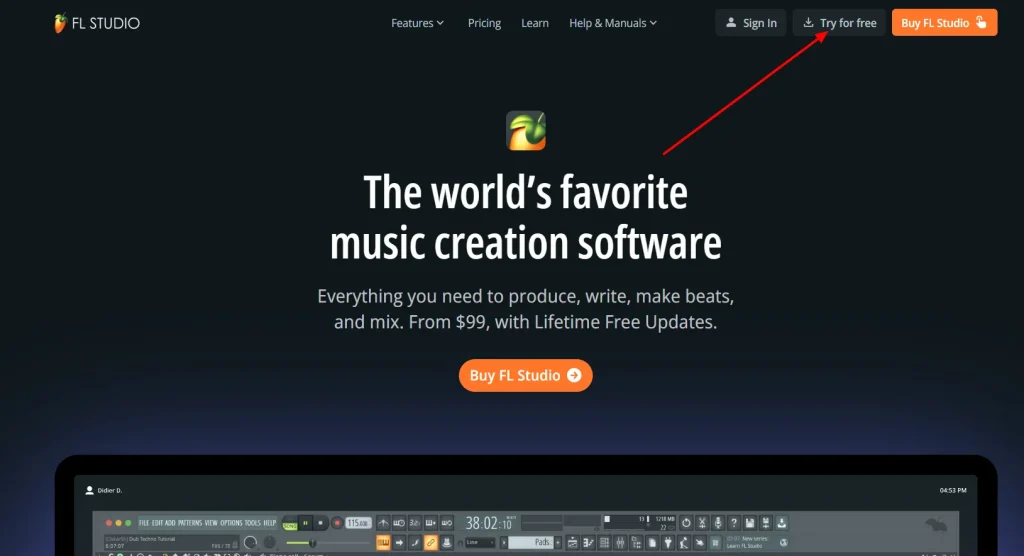
Then just choose between the Windows or macOS versions depending on what operating system is on your computer.
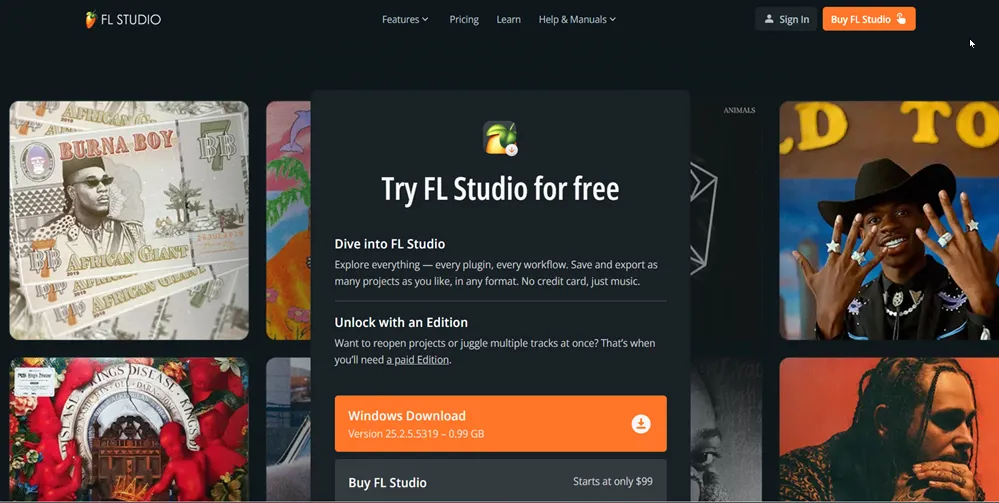
Once installed on your computer, you can open the DAW to get started composing music and exploring what is offered.
With the free demo version, which is fully functional, you can:
You can’t:
There’s no time limit on the demo. When you’re ready to upgrade, purchase a license from Image-Line and use your registration code to unlock your chosen edition. You don’t need to reinstall anything – the same application you’ve been using as a demo becomes your full licensed version.
What About FL Cloud?
FL Cloud is a subscription service from Image-Line that sits alongside FL Studio as an optional add-on. It’s not part of the core DAW, but it’s worth knowing about because it shows up when you’re using the software.
The service gives you access to a large library of sounds, loops and samples, a collection of third-party plugins, and AI-powered mastering tools.
There’s also a distribution feature through DistroKid built into the higher tiers if you want to release music to streaming platforms.
If you’re using the free demo, you automatically get FL Cloud Free, which includes 100 download credits to pull sounds from the library. It’s a nice bonus that gives you real content to work with while you’re testing the DAW.
FL Cloud is available on three tiers:
- FL Cloud Free – included automatically with the demo and any paid license
- FL Cloud Plus – $9.99/month with expanded library access and plugin collection
- FL Cloud Pro – $14.99/month with full library access, all third-party plugins, AI mastering and DistroKid distribution included
The demo’s 100 credits give you a taste of what the library has to offer, but FL Cloud itself is a separate decision from buying FL Studio. You can own a full FL Studio license and never subscribe to FL Cloud as it’s entirely optional.
Why Upgrade To Full Version of FL Studio
The biggest limitation of the FL Studio demo is that you cannot reopen saved projects.
FL Studio’s free trial is there so that you can test drive their DAW as much as you like. If you’re serious about music production and want to continue with FL Studio then you will need to have a license for a paid version of the software.
This unlocks all your saved projects and the full experience of making beats with FL Studio.
Other benefits of owning the DAW include:
There are 4 different editions of FL Studio available.
- Fruity Edition ($99) – basic, entry level version
- Producer Edition ($179) – full virtual studio and the most popular version
- Signature Bundle ($269) – Producer Edition plus advanced plugins
- All Plugins Edition ($449) – every native plugin, instrument and effect included
Whichever version you choose, you’ll still need to download the FL Studio demo and then use your registration code to unlock it.
Not many software companies hand you the full product and say take as long as you need. FL Studio does. No time limit, no credit card, no crippled feature set – just the real DAW to work with until you decide it’s worth paying for.
If you’re curious about music production or already know FL Studio is the DAW you want to learn, the demo is the obvious starting point. Download it, build something, and see how it feels.
The Producer Edition at $179 is where most people land when they’re ready to commit, and the lifetime free updates mean it’s a purchase you make once.