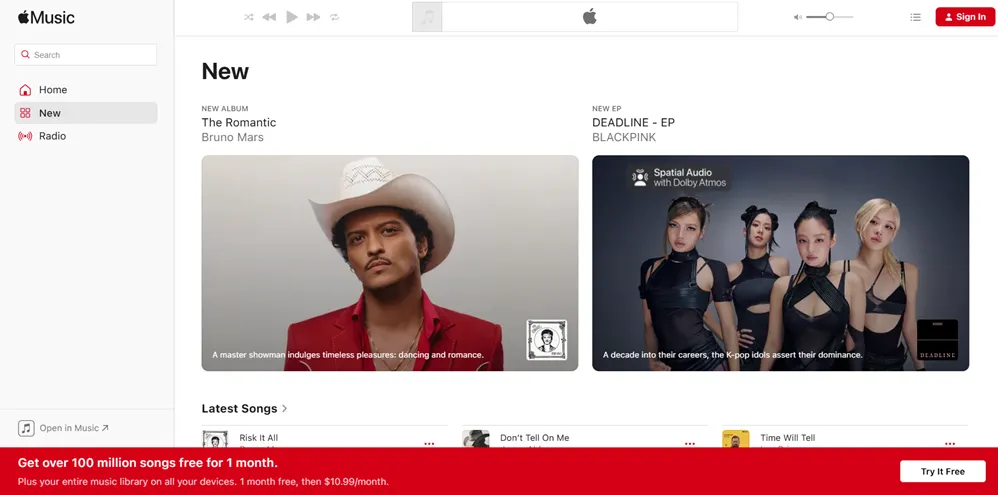
If you’ve been on the fence about Apple Music, the free trial is a pretty low-stakes way to find out if it’s worth your money. No ads, full access, and depending on how you sign up, you could get anywhere from one to three months to explore everything it has to offer.
Apple Music launched in 2015 and has grown into one of the biggest music streaming services in the world, with over 100 million songs, curated playlists, and a radio station, Apple Music 1, that broadcasts live around the clock. It’s a serious platform, and the free trial gives you the real thing, not a watered-down version.
Where it really shines, though, is for people already using Apple devices. If you’re on an iPhone, have an Apple Watch, drive with CarPlay, or have a HomePod sitting on your counter, Apple Music integrates with all of it in ways that other streaming services just don’t. Spotify works on everything, but Apple Music belongs on Apple hardware, and that difference is noticeable from day one.
I’ve tried a bunch of these streaming platforms over the years, and Apple Music is one I keep coming back to. The audio quality alone, especially if you’re listening through AirPods or a decent set of headphones, is hard to argue with.
That said, it’s not perfect for everyone. If you’re not in the Apple ecosystem at all, or you’re heavily invested in a platform like Spotify where you’ve built years of playlists and recommendations, the switch takes some adjustment.
This article will walk you through exactly what you get during the trial, what to watch out for, and how to make the most of your free time with the service so you can make that call for yourself.
This post may contain affiliate links. TrialBear earns commissions at no extra cost to you when purchases are made through links on this page. For more info, visit the disclosure page.
Apple Music Verdict & Rating
Rating: 4.5/5 Bears 🐻🐻🐻🐻½
Quick Verdict:
Apple Music delivers one of the strongest free trials in music streaming, especially if you’re already living in the Apple ecosystem.
Standout Indicators:
✅ 100 million+ songs
✅ Lossless and Dolby Atmos audio quality
✅ Works seamlessly across all Apple devices
✅ No ads – even during the trial
❌ Less intuitive for non-Apple users
What You Get On The Apple Music Free Trial
The Apple Music free trial gives you full access to the paid service. Nothing is locked away or held back to pressure you into subscribing. Here’s what that actually means in practice.
The entire library of 100 million+ songs is available to stream from day one. You can search for anything, add it to a playlist, download it for offline listening, and pick up where you left off across any of your devices. That last part matters more than it sounds. If you start a playlist on your phone during your commute and want to continue it on your laptop at home, it just works.
Apple Music also includes:
- Lossless audio – higher quality sound than standard streaming, available at no extra cost
- Dolby Atmos / Spatial Audio – an immersive listening experience on supported devices and headphones
- Apple Music 1 – a live global radio station with DJ-hosted shows and artist interviews
- Focus Playlists and Mood Mixes – curated playlists built around what you’re doing or how you’re feeling
- Lyrics – real-time lyrics on screen as songs play
- Music Videos – a library of official videos you can watch inside the app
- iCloud Music Library – your personal music collection syncs across devices alongside your Apple Music catalog
For casual listeners, most of this is more than enough. You get great sound, easy discovery, and a clean interface to navigate it all.
If you’re a more engaged music fan, someone who cares about audio fidelity, follows specific artists closely, or likes to dig into deeper catalog cuts, Apple Music holds up well there too. The lossless and Spatial Audio options are genuinely impressive, and the editorial playlists tend to go beyond the obvious choices.
One thing worth knowing: downloaded songs are only available while your subscription is active. If you download an album during the trial and don’t subscribe afterward, those downloads disappear. The music lives in Apple’s library, not on your device permanently.
Apple Ecosystem Perks
This section is really for anyone already using Apple products. Because if that’s you, Apple Music does things no other streaming service can quite match.
Siri is the most immediate one. You can ask Siri to play a specific song, skip a track, turn on a playlist, or find music that fits a mood – all without touching your phone. It works well, and it works hands-free across iPhone, iPad, Mac, HomePod, and Apple Watch.
Apple Watch support means your music goes with you even when your phone doesn’t. You can store playlists directly on your Watch and listen through Bluetooth headphones while you run or work out – no phone required. Spotify offers this too, but only on paid plans and with more setup friction. With Apple Music, it’s straightforward.
CarPlay is another quiet win. If your car supports it, Apple Music integrates cleanly into your dashboard display. You get album art, easy controls, and Siri voice commands without taking your eyes off the road. It feels native because it is.
HomePod and HomePod mini users get the most seamless experience of anyone. Apple Music is the default music service for HomePod, which means better voice recognition, automatic stereo pairing if you have two units, and room-aware audio tuning that other services don’t get access to.
And then there’s Handoff – Apple’s feature that lets you move what you’re doing from one device to another mid-stream. Start a song on your iPhone, walk over to your Mac, and it picks up right where you left off without any manual switching.
If you’re not in the Apple ecosystem at all, say you’re on Android or Windows, you can still use Apple Music through the Android app or a web browser, and it works fine. But you won’t get any of these perks, and honestly, at that point Spotify or Amazon Music might be a better fit for how you actually use your devices.
Hidden Gotchas
Apple Music is pretty straightforward as far as free trials go, but there are a few things worth knowing before you start.
You need a credit card to sign up
There’s no way around this one. Apple requires a valid payment method to activate the trial, and it will automatically charge you when the trial period ends if you don’t cancel first. This is standard practice for most streaming services, but it catches people off guard if they’re not expecting it.
The auto-renewal happens quietly
Apple doesn’t send you a reminder email when your trial is about to expire. The responsibility is on you to keep track of the end date and cancel if you decide not to continue.
The simplest thing to do is set a reminder on your phone the day you sign up. Give yourself a day or two of buffer before the trial actually ends.
Trial length varies
The standard trial through Apple’s website or the App Store is one month. But if you’re setting up a new Apple device, buying AirPods, or subscribing through certain partners, you might qualify for a three-month trial. It’s worth checking before you sign up through the first link you find.
Family plan trials work differently
If you’re thinking about the Family plan, the trial is tied to the account that starts it. Other family members can join during the trial period, but the billing kicks in for everyone once it ends.
Downloaded music disappears if you don’t subscribe
As mentioned earlier, anything you download during the trial is only accessible while you’re a paying subscriber. The moment your subscription lapses, those offline downloads become unavailable, though they’ll come back if you resubscribe later.
None of these are dealbreakers, but knowing them ahead of time means no surprises on your credit card statement.
Getting The Most Out of Your Apple Music Free Trial
A month goes faster than you think, so it helps to go in with a plan rather than just browsing randomly for a few weeks and then forgetting about it.
Start with what you already love
The first thing to do is search for your favorite artists and albums and see how Apple Music handles music you already know well. Check the audio quality, explore the discography pages, and see if there’s anything in their catalog you hadn’t found before. This gives you an honest baseline before you start exploring new territory.
Turn on Lossless Audio early
By default, Apple Music may not have lossless audio enabled depending on your settings.
Go into Settings > Music > Audio Quality and switch it on.
If you’re listening through decent headphones or a good speaker, the difference is noticeable. This is one of Apple Music’s strongest selling points, so you want to actually experience it during your trial.
Try Spatial Audio on the right content
Not every song has a Dolby Atmos mix, but many do, especially newer releases.
When you’re on a track that supports it, you’ll see a Dolby Atmos badge. Listen through AirPods Pro or AirPods Max if you have them. It’s one of those features that sounds like marketing until you actually hear it.
Let the algorithm learn from you
Apple Music’s recommendations get better the more you use it. Add songs you like to your library, rate tracks, and spend time in the Listen Now tab. The more you interact with it in the first week or two, the more useful the recommendations become by the end of the trial.
Explore at least one editorial playlist
Apple Music’s human-curated playlists – especially the genre-specific ones – are genuinely good. They go deeper than the obvious hits and tend to surface artists you might not have found on your own. Pick a genre you love and spend some time there.
Test the offline download feature
If you commute, work out, or travel anywhere with spotty signal, download a few albums or playlists and listen to them offline. This is a core feature of the paid plan and worth evaluating during the trial to see how much you’d actually use it.
The goal by the end of your trial is to have a clear sense of whether Apple Music fits how you actually listen to music, not just whether it works, but whether it’s something you’d genuinely miss if it went away.
Signing Up for Apple Music Free Trial
Getting started with Apple Music takes about five minutes, and the process is straightforward whether you’re on an iPhone, iPad, Mac, or Android device.
On iPhone, iPad, or Mac:
- Open the Apple Music app – it comes pre-installed on all Apple devices, so there’s nothing to download
- Tap or click “Try it Free” when prompted, or go to Settings > Music and select the subscription option
- Choose your plan – Individual, Student, or Family
- Sign in with your Apple ID (or create one if you don’t have one yet)
- Confirm your payment method – Apple will use whatever card is already on file with your Apple ID, or you can add a new one
- Tap “Start Trial” and you’re in
The whole thing takes under five minutes if your Apple ID and payment info are already set up, which they likely are if you’ve ever bought anything from the App Store.
On Android:
- Download the Apple Music app from the Google Play Store
- Open the app and tap “Try it Free”
- Create an Apple ID if you don’t have one, or sign in with an existing one
- Enter your payment details
- Select your plan and confirm
Android setup takes a few extra minutes simply because you may need to create an Apple ID from scratch, but the process is still clean and well-guided.
Via Browser:
I usually take all my free trials using my computer’s browser and you can definitely do the same with Apple Music.
If you’d rather sign up on a computer, go to music.apple.com, click “Try it Free,” and follow the same steps. This works on any browser regardless of what device you’re on.
One thing to note: if you’ve used an Apple Music free trial before on the same Apple ID, you won’t qualify for another one. Apple tracks trials by Apple ID, not by device or payment method.
Apple Music Compared To Other Music Streaming Platforms
Apple Music, Spotify, and Amazon Music are the three most popular streaming services right now, and they’re genuinely different in ways that matter depending on how you listen.
Apple Music vs. Spotify
This is the comparison most people are actually making. Spotify has a larger global user base and a free ad-supported tier, which Apple Music doesn’t offer. If you want Apple Music, you’re paying for it after the trial. That’s a real difference for anyone not ready to commit to a monthly fee.
Where Apple Music pulls ahead is audio quality. Lossless and Spatial Audio are included in every Apple Music plan at no extra cost. Spotify has been rolling out its own higher quality audio tier, but Apple Music has had a head start and the implementation is more seamless on Apple hardware.
Spotify’s discovery algorithm is widely considered the best in the business. If finding new music is important to you, Spotify’s Discover Weekly and Daily Mixes are hard to beat. Apple Music relies more on human curation, which produces great playlists but a different kind of discovery experience.
If you’re deep in the Apple ecosystem, Apple Music is the more natural fit. If you use a mix of devices – Android, Windows, smart TVs, gaming consoles – Spotify’s broader compatibility makes it more practical.
Apple Music vs. Amazon Music
Amazon Music is worth considering if you’re already an Amazon Prime member, because Prime includes a version of Amazon Music at no extra cost. It’s a smaller library and doesn’t have the same depth of features, but for casual listening it’s serviceable, and free is hard to argue with.
Amazon Music Unlimited is the full-featured tier that competes more directly with Apple Music. It’s comparably priced and includes lossless audio, but the app experience and curation don’t quite match Apple Music’s polish.
Where Amazon Music wins is value for existing Prime and Echo users. Alexa integration is excellent, similar to how Apple Music works best with Siri and HomePod.
If you want a deeper look at what Amazon Music’s free trial offers, I covered it in detail in this article.
The short version: if you’re an iPhone user who listens to music seriously, Apple Music is the strongest choice of the three. If you’re platform-agnostic or budget-conscious, Spotify and Amazon Music both have real arguments in their favor.
Apple Music Pricing After the Free Trial
Once your trial ends, Apple Music rolls into a paid subscription automatically. Here’s what each plan costs:
- Individual — $10.99/month
- Student — $5.99/month (requires verification through UNiDAYS)
- Family — $16.99/month (up to 6 people)
- Apple One (Individual) — $19.95/month (bundles Apple Music with Apple TV, Apple Arcade, and iCloud+ 50GB)
- Apple One (Family) — $25.95/month (same bundle for up to 6 people, with iCloud+ 200GB)
For most people, the Individual plan at $10.99 is the starting point, and it’s in line with what Spotify and Amazon Music Unlimited charge. Nothing stands out as a bargain at that tier. It’s just the going rate for a full-featured streaming service.
The Student plan is the best value on the board if you qualify. $5.99 a month for the exact same features as the Individual plan is a significant discount, and verification is quick through UNiDAYS. If you’re a current college or university student, this is the one to get.
An added perk of the Student plan is that you also get Apple TV at no extra cost.
The Family plan makes sense at three or more people. At $16.99 split between three people, you’re each paying under $6 a month. Each family member gets their own library, playlists, and recommendations. Nothing is shared unless you want it to be.
Apple One is worth a look if you’re already paying for other Apple services. If you subscribe to Apple TV and iCloud storage separately, the math often works out in Apple One’s favor. It’s not a music-specific decision, but if you’re evaluating your overall Apple subscription spend, it’s worth adding up what you’re currently paying before dismissing it.
Apple occasionally runs promotional pricing for new subscribers or device bundles, so it’s worth checking the current offer when you sign up. New Apple device purchases, particularly AirPods and HomePods, sometimes come with extended free trials rather than discounted pricing, which amounts to the same thing.
There are no annual plan discounts currently available for Apple Music on its own, unlike some competitors. You pay month to month regardless of plan.
Also note that pricing varies depending on your location.
How To Cancel Your Apple Music Free Trial
If you decide you don’t want to get billed automatically, you can cancel Apple Music before the trial ends. You’ll need to know where to look though – it’s not something Apple makes obvious.
On iPhone or iPad:
- Open the Settings app
- Tap your name at the top to open your Apple ID settings
- Tap “Subscriptions”
- Find Apple Music in the list and tap it
- Tap “Cancel Subscription”
- Confirm the cancellation
That’s it. You’ll see a confirmation that your subscription has been cancelled, and Apple Music will remain accessible until the trial period actually expires. You don’t lose access the moment you cancel.
On Mac:
- Open the Music app
- Click your account name or go to Account in the menu bar
- Select “Manage Subscriptions”
- Find Apple Music and click “Cancel Subscription”
- Confirm
On Android:
- Open the Apple Music app
- Tap the three-dot menu and go to Account
- Tap “Manage Subscription”
- Select “Cancel Subscription” and confirm
Via Browser:
Go to music.apple.com, sign in, click your profile icon, select “Settings,” then scroll to Subscriptions and cancel from there.
A few things to keep in mind after cancelling:
Any music you downloaded for offline listening will become unplayable once the trial period ends. Your playlists and library are saved to your account though, so if you resubscribe later – even months down the line – everything will still be there waiting for you.
Cancel at least 24 hours before your trial end date to be safe. Apple processes cancellations quickly, but giving yourself a buffer avoids any timing issues around the billing cycle.
If you’re ever unsure when your trial ends, go back to Settings > Your Name > Subscriptions on your iPhone — it shows the exact renewal date next to the Apple Music listing.
Try Apple Music for Free
Apple Music is a well-built service with a lot going for it – a massive library, genuinely impressive audio quality, and an experience that feels at home on Apple devices in a way no other streaming service does.
The free trial gives you full access to all of it, which means you have everything you need to make an honest decision without spending a dollar.
If you’re already using an iPhone, AirPods, or any other Apple hardware, the case for at least trying it is pretty strong. The Siri integration, the seamless device switching, the lossless audio – these aren’t features you fully appreciate until you’ve lived with them for a few weeks. That’s exactly what the trial is for.
It’s not the perfect fit for everyone. If you’re not in the Apple ecosystem, or you’ve spent years building a library on Spotify that you’re not ready to walk away from, those are real considerations. But if you’ve been curious about Apple Music and just haven’t pulled the trigger, there’s no better time to find out than when it’s free.
I’ve used a lot of these platforms over the years, and Apple Music has earned its place as one of the best.
Whether it’s the right one for you comes down to how you listen and what devices you use. The trial is the most honest way to answer that question. You’ve got nothing to lose and potentially a new favorite way to listen to music.