

If you use SoundCloud, you already know it is not just another music streaming app.
It’s where new artists show up before they blow up. It’s where DJs post full sets, producers upload rough demos, and remixes live that will never touch Spotify or Apple Music. For a lot of listeners, SoundCloud is the place you go when the mainstream playlists start feeling stale.
The problem is the free version hits a wall fast.
You get ads. You get tracks that cut off after 30 seconds. And the moment you want to listen offline or skip freely, the experience starts to feel limited. That is where SoundCloud Go and SoundCloud Go+ come in.
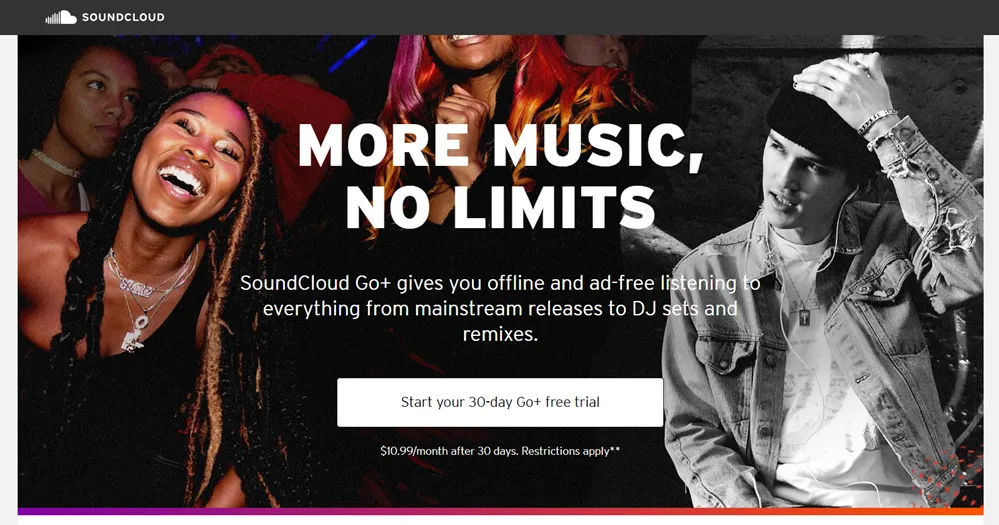
SoundCloud offers two paid plans with free trials. SoundCloud Go gives you a short 7-day trial, while SoundCloud Go+ gives you a much more generous 30 days to test the full experience. Both remove ads and unlock offline listening, but they are built for slightly different types of listeners.
I have tested most major music streaming trials, and SoundCloud remains the most unique when it comes to unreleased and community-driven content.
This guide breaks down everything you need to know about the SoundCloud Go free trial.
We will cover what you actually get during the trial, how Go and Go+ compare, the hidden limitations SoundCloud does not always make obvious, and whether it is worth choosing SoundCloud over bigger names like Spotify or Apple Music.
If you care about discovering new music, finding underground tracks, and listening without ads on your phone, this is the part where you figure out if the SoundCloud Go free trial is worth your time or if you should skip it altogether.
This post may contain affiliate links. TrialBear earns commissions at no extra cost to you when purchases are made through links on this page. For more info, visit the disclosure page.
TrialBear Verdict & Rating
Rating: 4/5 Bears 🐻🐻🐻🐻☆
Quick Verdict:
SoundCloud Go+ delivers a strong 30-day trial for discovering underground and unreleased music, but the 7-day Go trial feels short compared to most competitors.
Standout Indicators
- ✅ Best for indie, underground, and remix culture
- ✅ Go plan is one of the cheapest ways to get ad-free listening
- ❌ Short free trial compared to competitors
Quick Take
If you want a proper test of what SoundCloud can do, Go+ is the clear winner. The Go trial works, but you will need to move fast to decide if it fits your listening habits.
What You Get With the SoundCloud Go Free Trial
This is where the SoundCloud Go free trial actually earns its value.
The free version of SoundCloud is fine for casual listening, but it comes with limits that show up fast. Ads break the flow. Some tracks stop after 30 seconds. Offline listening is locked.
The Go and Go+ free trials remove those barriers, but not in the same way. Here is what you get with each plan while the trial is active.
What You Get With SoundCloud Go
SoundCloud Go is the lighter upgrade, but it still fixes the biggest downsides of using free SoundCloud.
With the Go free trial, you get:
- Ad-free listening across the app
- Unlimited offline saves on supported tracks
- Full-length playback for most tracks
- High-quality audio streaming
- Access to SoundCloud’s core catalog
This plan is best if you mainly use SoundCloud for discovery and background listening. You still get the community-driven catalog, reposts, and underground uploads that make SoundCloud unique.
What You Get With SoundCloud Go+
SoundCloud Go+ is the full experience, and it shows immediately.
During the Go+ free trial, you get:
- Everything included in SoundCloud Go
- Access to SoundCloud’s entire licensed catalog
- Millions of mainstream tracks from major labels
- No 30-second previews
- High-quality audio streaming
- Access to advanced DJ and mixing features in select apps
Go+ unlocks over 135 million tracks in full. That is the key difference.
On the free tier, many songs are only available as short previews. With Go+, those same tracks play in full, making SoundCloud feel much closer to a complete streaming service.
What Free Users Do Not Get
If you are coming from the free version, here is what changes immediately when the trial starts:
- Ads are removed
- Offline listening becomes available
- Track previews turn into full songs
- Skipping limits disappear
This is why the free trial matters. It shows you what SoundCloud is actually like without the restrictions holding it back.
If you want to test SoundCloud properly, the Go+ free trial gives you the clearest picture of what the platform can offer.
Hidden Gotchas You Should Know
The SoundCloud Go free trial is easy to start, but there are a few details that can catch people off guard if they do not know what to look for.
None of these are deal-breakers, but they matter if you want to avoid surprise charges or frustration later.
The Free Trial Is Only for New Subscribers
This is the biggest one.
If you have subscribed to SoundCloud Go or Go+ in the past, you will not qualify for another free trial. Even if it was years ago, SoundCloud usually flags the account as ineligible.
If you are unsure, check your subscription status before signing up.
Auto-Renewal Starts Immediately
Like most streaming services, SoundCloud requires a payment method upfront.
Once the free trial ends:
- SoundCloud Go renews at $4.99 per month
- SoundCloud Go+ renews at $10.99 per month
If you cancel during the trial, you still keep premium features until the trial period ends. Just make sure you cancel before the last day.
The Go Trial Is Very Short
SoundCloud Go only offers a 7-day free trial.
That is noticeably shorter than:
- Spotify Premium
- Apple Music
- Amazon Music Unlimited
If you choose Go, you need to test offline listening and ad-free playback right away. There is not much time to decide.
Free Tier Limits Are Track-Dependent
Not all free-tier limitations are obvious.
Some artists allow full playback for free. Others limit tracks to previews only. This can make the free version feel inconsistent.
The trial removes those limits, but once it ends, those restrictions return unless you stay subscribed.
Knowing these details ahead of time helps you decide which trial to start and when to cancel if it is not for you.
Getting the Most Out of Your SoundCloud Go Free Trial
The SoundCloud Go free trial is short, especially on the Go plan. If you want to know whether it is worth paying for, you need to use the time wisely.
Here is how to get the most value out of it.
Start With Go+ If You Are Unsure
If you are on the fence, choose the Go+ free trial.
You get 30 days instead of 7, and you unlock the full licensed catalog. That gives you enough time to test both mainstream listening and underground discovery without rushing.
You can always downgrade later.
Download Music for Offline Listening Right Away
Offline listening is one of the biggest upgrades.
As soon as the trial starts:
- Download a few playlists
- Save albums or DJ sets you listen to often
- Test offline mode during commutes or workouts
This is the feature most people miss once the trial ends.
Follow Artists Early
SoundCloud’s recommendations improve based on who you follow.
Spend the first day:
- Following artists you already like
- Following DJs and producers you discover
- Engaging with reposts and mixes
This helps your feed feel more relevant faster. I immediately noticed SoundCloud recommendations got better after following a few producers and DJs.
Explore DJ Sets and Long Mixes
This is where SoundCloud really separates itself.
Use the trial to explore:
- Full DJ sets
- Extended mixes
- Unreleased demos and edits
These are the types of tracks that rarely show up on other platforms.
Test Mainstream Listening Too
If you are on Go+, do not skip this.
Search for artists you normally listen to on Spotify or Apple Music. This helps you see whether SoundCloud can replace or complement your current streaming setup.
If it works for both, the subscription becomes much easier to justify.
Using the trial with intention makes the decision clearer before your card ever gets charged.
Signing Up for the SoundCloud Go Free Trial
Signing up for SoundCloud Go is a simple process. You can breeze through it on iOS or Android devices but for this article, I’m going to do it on desktop where I take all my free trials.
Make sure it’s available in your area and that you have your credit card info on hand.
Here’s how it works:
Step 1: Visit the official SoundCloud Go page
To start either the 7-day Go free trial or the 30-day Go+ free trial, visit the official SoundCloud Go page where you’ll see all the info you need on each offer.
You can compare subscriptions although you’ll be able to make a more informed decision after reading this article.
Step 2: Choose Go or Go+
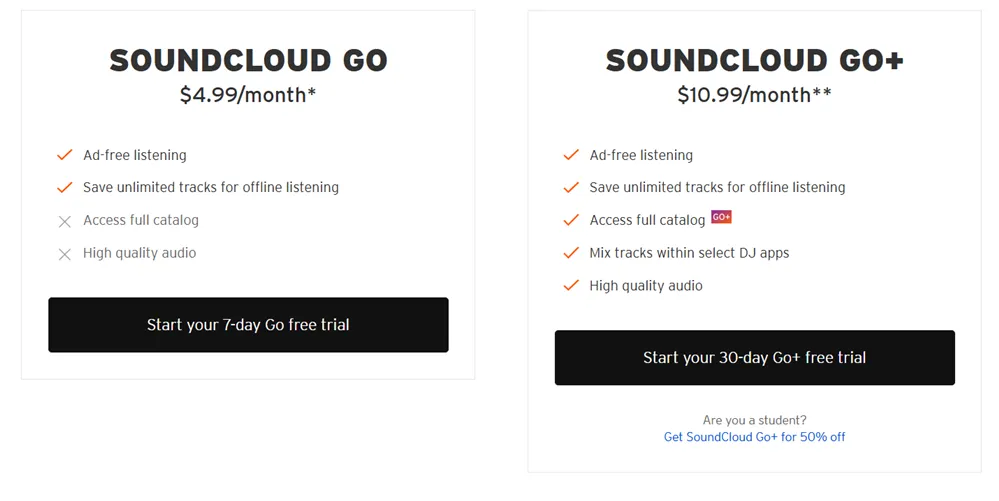
The choice is yours. Decide which one is best for you. I’m going with SoundCloud Go+ for the longer trial because I can always cancel at any time or downgrade long after the 7-day period offered with Go.
Step 3: Sign in or create your account
More than likely, you’re already a SoundCloud user if you’re going for a Go subscription so the next step is to sign in. If not, you can easily create an account using your Facebook, Google or Apple accounts or just sign up using email and a secure password.
Step 4: Enter you payment details
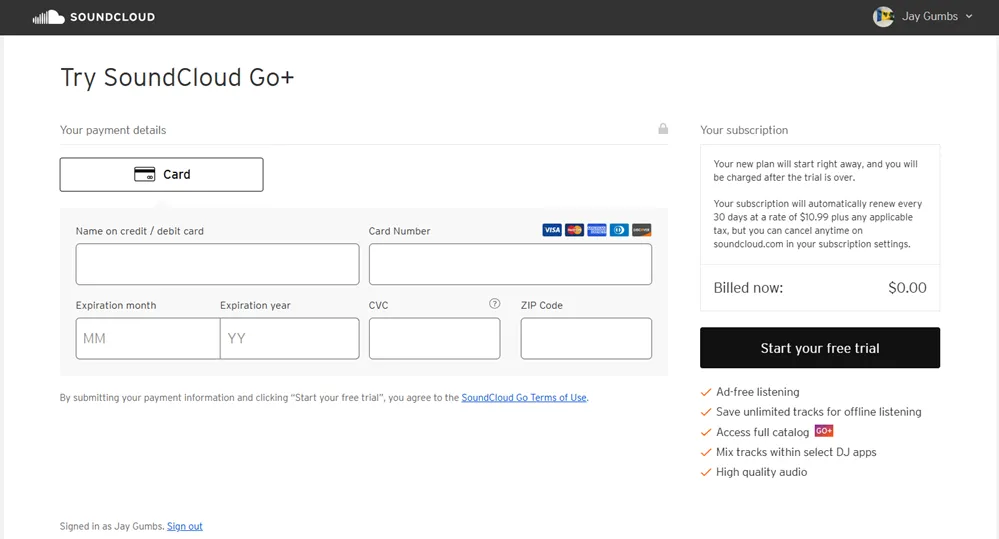
Next, you can enter your payment details using a credit card. No other payment options are available.
SoundCloud doesn’t charge you until after the trial period is over. You can cancel at any time before the last day of your free trial in your subscription settings.
Step 5: Start listening
That’s it. Once you’ve entered your payment method and there are no issues, you can start listening to an ad-free experience and start downloading tracks to listen offline.
The entire process should take you less than 3 minutes. Signup should look just about the same on mobile.
My Experience Exploring SoundCloud Go+
SoundCloud Go+ feels familiar if you have used the free version before, but the experience changes once the restrictions are removed. The app becomes smoother, faster, and easier to stay inside for long listening sessions.
Here is what to expect day-to-day.
Interface and Ease of Use
The layout is clean and simple.
Your feed is driven by:
- Artists you follow
- Reposts from the community
- Tracks you have liked
There is a small learning curve if you are coming from Spotify or Apple Music. SoundCloud does not push polished playlists as aggressively. Instead, it rewards exploration.
Once you get used to scrolling through reposts and profiles, the interface makes more sense.
Discovery Experience
This is where opinions split.
SoundCloud’s discovery is more manual than algorithmic. You will not get a Discover Weekly-style playlist that feels perfectly tuned out of the box.
What you do get is:
- Early access to new music
- Direct connections to artists and producers
- A community-driven feed that surfaces hidden tracks
If you like digging, SoundCloud shines. If you want the app to do all the work, it can feel less refined.
Mobile Listening Experience
Most SoundCloud listening happens on phones, and it shows.
The mobile app is:
- Fast and responsive
- Built for long sessions
- Strong with offline playback
Downloads are easy to manage, and switching between online and offline listening is seamless. During the Go+ trial, offline listening worked smoothly on my phone during commutes.
Audio Quality
SoundCloud Go+ streams at up to 256kbps AAC.
That is solid quality for everyday listening, especially on mobile. It does not match lossless options from Apple Music, but most listeners will not notice the difference without high-end headphones.
Customer Support
Support is handled through:
- A help center
- Ticket-based support
There is no live chat, but common issues are covered well. Most problems can be resolved without contacting support at all.
Overall, SoundCloud Go delivers a smooth experience once the ads and previews are gone. It feels less polished than some competitors, but more personal and discovery-focused.
SoundCloud Go Compared to Other Music Streaming Services
SoundCloud Go sits in a very different lane than most mainstream streaming platforms. If you’re like me, then you know exactly why you’re trying SoundCloud Go. The best way to decide if the free trial is worth it is to see how it stacks up against the big names.
Here is a clear, practical comparison.
SoundCloud Go vs Spotify Premium
Spotify is built around playlists and algorithms. SoundCloud is built around creators and communities.
Where SoundCloud Wins
- Access to underground and unreleased music
- Full DJ sets and extended mixes
- Direct artist uploads without labels
Where Spotify Wins
- Better discovery algorithms
- Longer free trial
- More polished playlists
Spotify Premium feels more automated. SoundCloud Go feels more hands-on. If you enjoy searching and digging, SoundCloud has the edge.
SoundCloud Go vs Apple Music
Apple Music focuses on audio quality and ecosystem integration.
Where SoundCloud Wins
- Indie and experimental content
- Community-driven discovery
- Lower entry price with Go
Where Apple Music Wins
- Lossless and spatial audio
- Tighter integration with Apple devices
- Longer trial options
If you care about cutting-edge audio features, Apple Music is ahead. If you care about finding new artists early, SoundCloud is stronger.
SoundCloud Go vs Amazon Music Unlimited
Amazon Music offers long trials and a large mainstream catalog, but it is less culture-focused.
Where SoundCloud Wins
- Unique catalog you cannot find elsewhere
- Better DJ and remix content
- Strong creator ecosystem
Where Amazon Music Wins
- Much longer free trial
- Larger mainstream catalog
- Better value for Prime users
Amazon Music is about value and convenience. SoundCloud is about discovery and depth.
The Big Picture
SoundCloud Go is not trying to beat these services at their own game.
It works best as:
- A primary platform for discovery
- A secondary platform alongside Spotify or Apple Music
The free trial helps you decide which role it should play in your listening setup.
Pricing After the Free Trial
Once your SoundCloud Go free trial ends, you will roll into a paid plan unless you cancel. What you’re charged depends on which free trial you signed up for. Here is a clear breakdown of the pricing and what you get at each level.
SoundCloud Go Pricing
Monthly Price: $4.99
What You Get
- Ad-free listening
- Offline saves
- Full-length tracks for most uploads
- Access to SoundCloud’s core catalog
Best For
- Budget-conscious listeners
- People who primarily enjoy indie, underground, and community content
SoundCloud Go is one of the most affordable ad-free plans in the streaming world, but it comes with a smaller licensed catalog compared to bigger services.
SoundCloud Go+ Pricing
Monthly Price: $10.99
What You Get
- Everything in SoundCloud Go
- Full access to the entire licensed catalog
- No 30-second previews
- Millions of mainstream tracks
- Higher quality audio streams
- Advanced DJ app integration (in select apps)
Best For
- Serious music fans
- Listeners who want both mainstream and indie tracks
- Anyone who wants to test SoundCloud like a full streaming service
Go+ is priced similarly to other major platforms’ premium plans, but it includes unique content you cannot find on those services.
How It Compares to Competitors
Spotify Premium
- Around $11.99/month
- Longer free trial
- Strong algorithmic discovery
Apple Music
- Around $10.99/month
- Long trial, lossless and spatial audio included
Amazon Music Unlimited
- Often cheaper for Prime members
- Very long trial periods
- Big mainstream catalog
Quick Take
SoundCloud Go is the cheapest way to get ad-free streaming, but Go+ is more directly comparable to Apple Music and Spotify Premium in price and catalog size.
If you use SoundCloud as your main music app, Go+ makes the most sense. If you just want ad-free listening on a budget, Go is still a solid choice.
| Service | Free Trial Length | Monthly Price | Best for Discovery | Audio Quality |
|---|---|---|---|---|
| SoundCloud Go | 7 days | $4.99 | Underground, indie, DJ sets | Up to 256kbps AAC |
| SoundCloud Go+ | 30 days | $10.99 | Underground + mainstream | Up to 256kbps AAC |
| Spotify Premium | 30 days | $11.99 | Algorithmic playlists | Up to 320kbps MP3 |
| Apple Music | 1–3 months (varies) | $10.99 | Curated playlists + charts | Lossless + Spatial Audio |
| Amazon Music Unlimited | Up to 90 days | $10.99 (less with Prime) | Mainstream catalog | HD and Ultra HD |
Value Verdict
At the end of the day:
- Go is the best value if you mostly care about exploration and minimal cost.
- Go+ is the best value if you want a full catalog and plenty of time to test the service before subscribing.
Both plans are cheaper than or on par with major competitors, but only Go+ gives you a true “full streaming experience” on SoundCloud.
How to Cancel Your SoundCloud Go Free Trial
Canceling your SoundCloud Go free trial is straightforward, but the steps depend on where you signed up. The key thing to remember is timing.
As long as you cancel before the last day of your trial, you will not be charged. You will still keep premium features until the trial ends.
Here is how to do it on each platform.
Cancel on Web
If you signed up through SoundCloud’s website:
- Log in to your SoundCloud account
- Click your profile icon
- Go to Subscriptions
- Select your current plan
- Click Cancel subscription
- Confirm the cancellation
Once canceled, your plan will stay active until the trial period ends.
Cancel on iOS (iPhone or iPad)
If you subscribed through the App Store:
- Open Settings on your device
- Tap your Apple ID at the top
- Select Subscriptions
- Choose SoundCloud
- Tap Cancel Subscription
Apple handles billing, not SoundCloud, so canceling inside the app will not work.
Cancel on Android
If you subscribed through Google Play:
- Open the Google Play Store
- Tap your profile icon
- Select Payments & subscriptions
- Tap Subscriptions
- Choose SoundCloud
- Tap Cancel subscription
Your access will remain active until the trial expires.
Cancellation Deadline to Remember
Cancel at least 24 hours before your trial ends to be safe. This avoids last-minute billing issues, especially on mobile platforms.
After You Cancel
- You keep premium features until the trial ends
- Your account reverts to the free tier afterward
- You can still listen, but ads and previews return
Canceling does not delete your account or playlists. Everything stays in place if you decide to resubscribe later.
Try a SoundCloud Go Free Trial Today
The SoundCloud Go free trial is not about competing head-to-head with every other streaming service. It is about giving you a cleaner, unrestricted way to experience what makes SoundCloud different.
If you already use SoundCloud and feel limited by ads, previews, or online-only listening, the trial is an easy upgrade to test. Everything feels smoother once those barriers are gone.
For most people, SoundCloud Go+ is the better starting point. The 30-day trial gives you enough time to explore underground uploads, full DJ sets, and mainstream releases without rushing a decision. It shows you what SoundCloud can be when nothing is locked.
SoundCloud Go still makes sense if you want the cheapest path to ad-free listening and already know you love SoundCloud’s catalog. Just remember the 7-day trial moves fast.
Either way, the trial lets you decide with real listening time, not guesswork.
If discovering new music matters to you and you want ad-free, offline access without committing long-term, now is the best time to try it.


