If you’re shopping for a VPN and Surfshark keeps coming up, there’s a reason for that. It’s one of the few services that manages to hit the three things most people actually care about — reliable streaming unblocking, fast speeds, and a price that doesn’t feel like a commitment — without dropping the ball on any of them.
It’s been around since 2018, covers 100+ countries with 4,500+ servers, and has built a solid reputation particularly among people who use a VPN primarily to access geo-restricted content.
Surfshark consistently unblocks Netflix libraries, BBC iPlayer, Disney+, and Prime Video. I’ve gone through a few VPNs before landing on Surfshark and unblocking these services consistently is not something most VPNs on the market can claim.
The 7-day free trial is probably what brought you here. It exists, but it isn’t front and center when you land on their website — which we’ll walk you through. What matters is that when you do find it, you get full access to everything Surfshark offers, not a limited version of it.
This post may contain affiliate links. TrialBear earns commissions at no extra cost to you when purchases are made through links on this page. For more info, visit the disclosure page.
Surfshark Verdict & Rating
Rating: 4.5/5 Bears 🐻🐻🐻🐻½
Quick Verdict:
Surfshark is one of the best VPNs for unblocking geo-restricted streaming content — and at its price point, it’s hard to beat.
Standout Indicators
✅ Unblocks Netflix, BBC iPlayer, Disney+, Prime Video, and more
✅ Works on unlimited devices under one subscription
✅ One of the most affordable premium VPNs available
✅ One of few VPNs that consistently gets through BBC iPlayer’s blocks
✅ 7-day free trial available on desktop, iOS, and Android
❌ Free trial isn’t easy to find on the main website
❌ Renewal pricing jumps significantly after the first term
Quick Take
If you’re trying to access streaming content that’s blocked in your country, Surfshark is one of the most reliable tools for the job — and the 7-day trial gives you enough time to test it against the exact platform you’re trying to unlock before you commit to anything.
How To Find the Surfshark Free Trial
Surfshark doesn’t exactly put the free trial front and center. There are no visual indicators that Surfshark has a free trial if you land on their homepage. Most people either stumble onto it by accident or end up searching for it separately — which is exactly how I ended up finding it.
The trick is to scroll all the way to the bottom of the page. In the footer, you’ll find a link that says “VPN Free Trial.”
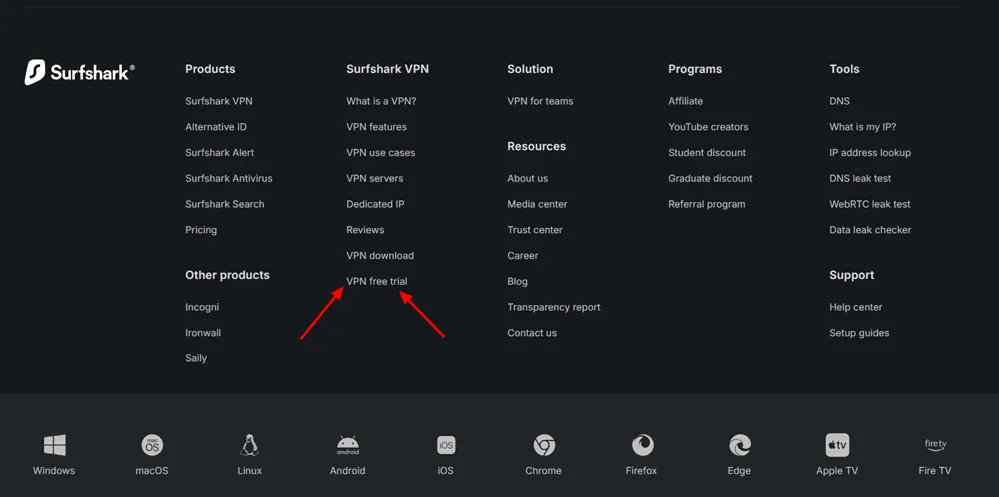
That’s your way in. Click it and it takes you to the dedicated trial page where you can see everything included and get started.
It’s a bit buried for something this useful, but at least it’s there.
How To Signup For Surfshark Free Trial
Once you find the Surfshark free trial page, it’s time to get started with your 7-day free trial. Here I’m going to walk you through how easy it is to signup and start unblocking streaming sites in less than 10 minutes.
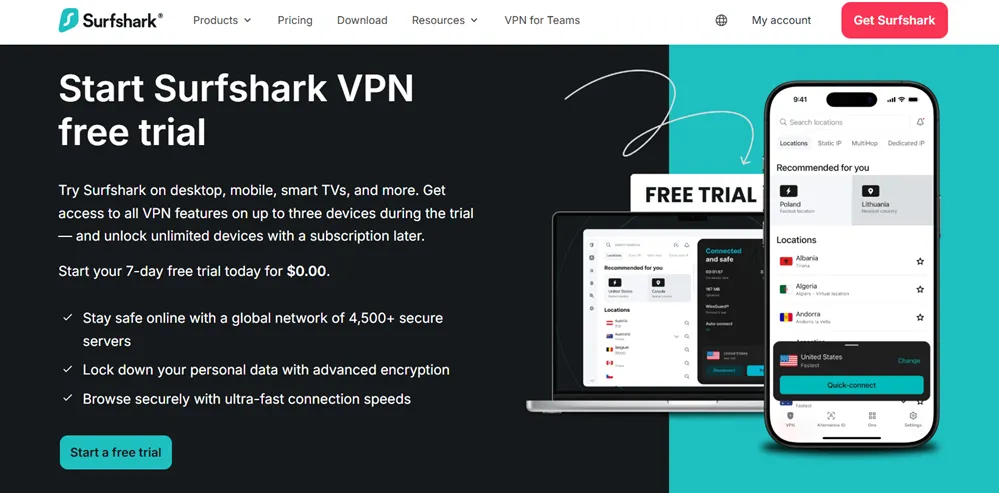
On the Surfshark free trial page, click on the “Start a free trial” button and then follow the instructions below.
Step 1: Choose a plan
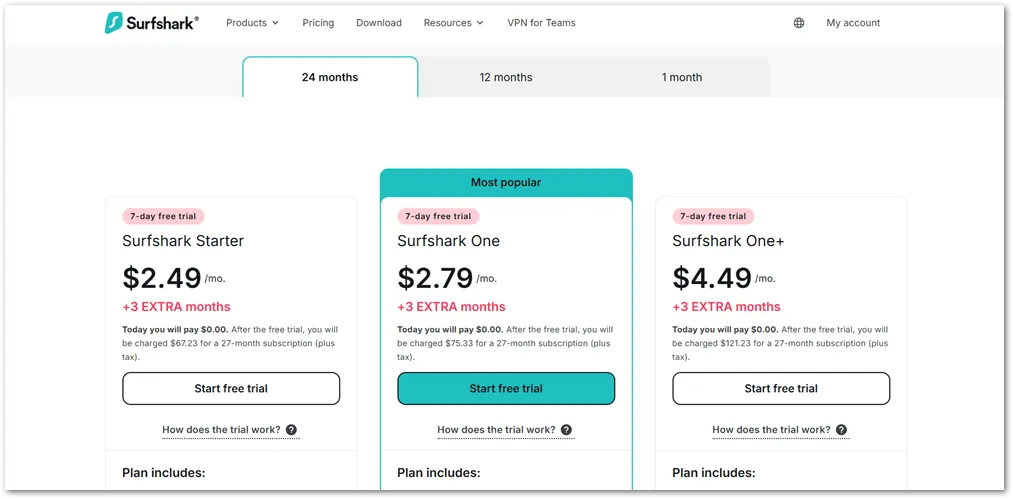
The first step is to choose a plan. There are three billing cycles (2 years, 1 year or 1 month). And under each billing cycle there are three different plans based on what each plan includes. Note that the free trial isn’t available on monthly billing so you’ll need to choose a plan on the 1-year or 2-year billing cycles.
I chose the Surfshark One plan on the 2-year billing cycle to free trial because it gives more discount and access to other features like Antivirus and Search protection – stuff that I probably wouldn’t use but I can test them for Trial Bear.
This is also their most popular plan because of the discount it gives for a 2-year period (it’s a very good deal for a premium VPN).
Under the plan you choose, click on the “Start Your Free Trial” button to go to the next step.
Step 2: Enter your order information
On the next page, you’ll enter your order information.
At the very top of the page, you’ll need to enter your email address or use the connect buttons to use your Google or Apple accounts.
One thing to note is that free trials are only available to persons using PayPal or credit card options. Other payment methods include Apple Pay, Google Pay and cryptocurrency but you wouldn’t be able to get a free trial if you use those.
I used PayPal to get my free trial and it was easy to connect and checkout. You can read the terms before to see how much you’ll be charged after the free trial and info about renewal.
Your billing method isn’t charged on activation of the free trial and you can cancel at any time before the trial ends to avoid getting billed.
Step 3: Download Surfshark for your device
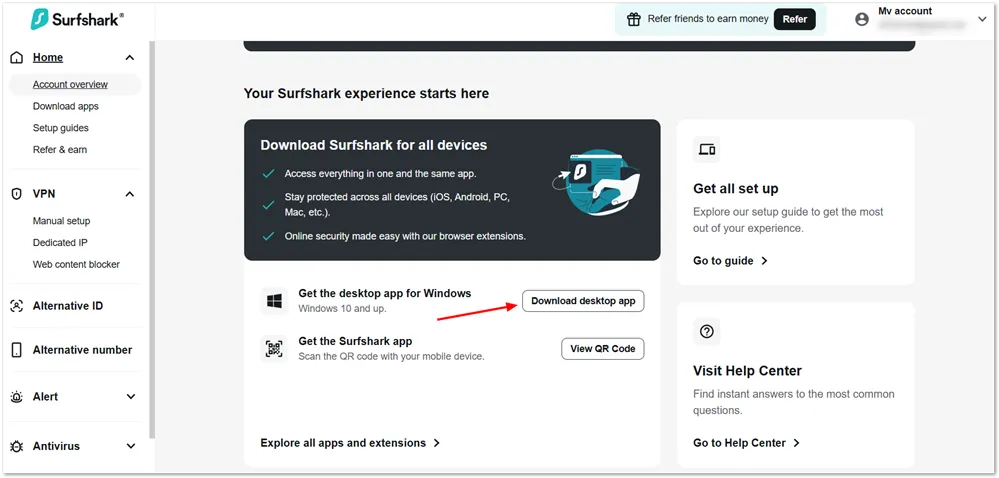
Once your payment method is accepted, you can go to the Surfshark dashboard to access your download.
Download and install the app to start unblocking streaming sites like Netflix, BBC iPlayer, Amazon Prime Video, and more.
What You Get on the Surfshark Free Trial
People use VPNs for different reasons. Surfshark covers these reasons well with their feature set.
The 7-day trial gives you full access to these Surfshark features — nothing is held back. Here’s what that actually looks like across the three main reasons people use it.
For streaming
This is where most people come to Surfshark, and it delivers. For example, I wanted to watch FIFA World Cup 2026 games and couldn’t find a stream where I lived. Surfshark and BBC iPlayer was my go to solution and it worked very well.
Users can connect to a server in another country and get access that country’s streaming libraries — Netflix regions, BBC iPlayer, Disney+, Prime Video, and more.
Surfshark maintains a large server network across 100+ countries, so you have plenty of location options depending on what you’re trying to watch. Speed is handled by the WireGuard protocol, which keeps things fast enough for HD and 4K without constant buffering.
For privacy and security
Every connection is protected with AES-256 encryption, which is the same standard used across the industry at the top level. On top of that, Surfshark includes a kill switch — if your VPN connection drops unexpectedly, the kill switch cuts your internet access rather than letting your real IP slip through.
CleanWeb handles ad and tracker blocking at the DNS level, which works even on mobile where browser-based ad blockers don’t.
There’s also MultiHop, which routes your traffic through two servers in two different countries instead of one, for situations where you want an extra layer of privacy.
And if you’re on a network that actively blocks VPN traffic, Camouflage Mode disguises your connection to look like regular browsing.
For general everyday use
Bypasser — Surfshark’s split tunneling feature — lets you decide which apps or websites go through the VPN and which connect normally. So if you want your banking app on your regular connection while everything else stays encrypted, you can set that up without toggling the VPN on and off.
There’s also Alternative ID, which is included on all plans and generates a separate online identity and alternate email address you can use when signing up for things you’d rather not tie to your real details.
What To Know Before Signing Up
Nothing here is a dealbreaker, but there are a few things worth knowing before you start the trial so nothing catches you off guard.
You need a credit card or PayPal to start.
The trial isn’t free in the sense that you just sign up with an email and go. You do have to enter payment details upfront. You won’t be charged during the 7 days, but the card is required to activate it.
Auto-renewal kicks in automatically when the trial ends.
If you don’t cancel before the 7 days are up, you’ll be charged for the full plan you signed up for. Surfshark does send a reminder before the trial expires, which is a nice touch, but set your own reminder too — don’t rely on an email you might miss.
Cancel at least 24 hours before the trial ends.
Not at midnight on day 7. Give yourself a buffer.
The renewal price after your first term is higher.
Surfshark’s promotional pricing applies to your first billing cycle only. When your plan renews — whether that’s after 12 or 24 months — it renews at the standard rate, which is noticeably higher. It’s something every VPN does, but it’s worth knowing going in so you’re not surprised when renewal time comes.
The 30-day money-back guarantee and the 7-day trial are separate.
If you let the trial convert to a paid plan and then decide Surfshark isn’t for you, you can still request a refund within 30 days of that charge. That effectively gives you up to 37 days before you’re truly committed to anything.
Getting The Most Out of Your Surfshark Free Trial
Seven days goes quickly, especially if you’re only dipping in casually. Here’s how to make the time count.
Test it against the exact thing you signed up for first.
Don’t spend day one exploring settings. Connect to the server location you actually need and confirm it works for your specific use case — the streaming platform, the website, whatever brought you to Surfshark in the first place. Everything else can wait. If it doesn’t do that one thing, you want to know on day one, not day six.
Try a few different server locations for the same platform.
Streaming services actively work to block VPN traffic, and occasionally a specific server will get flagged. If your first connection to a UK server doesn’t unlock what you’re looking for, try a different UK server before concluding it doesn’t work. Surfshark makes it easy to switch, and in most cases a different server in the same country solves it immediately.
Turn on CleanWeb.
It’s off by default. Switch it on in the settings and you’ll notice the difference pretty quickly — fewer ads, fewer trackers, and noticeably cleaner browsing especially on mobile where ad blockers don’t usually work at the browser level.
Set up Bypasser if you have apps that don’t play well with a VPN.
Banking apps are the most common example — some flag VPN traffic and refuse to load. Rather than toggling the VPN off every time, add those apps to Bypasser so they connect normally while everything else stays protected.
Install it on more than one device.
The trial works across your devices, so don’t just test it on your phone. If you plan to use Surfshark on your laptop, smart TV, or tablet, get it set up on those too so you know the experience holds up everywhere you’ll actually use it.
Set a cancellation reminder right now.
Before you do anything else. Pick day 5 or 6, not day 7. I cancelled on Day 2 since I can keep using the service until it expires.
Surfshark Compared To…
Surfshark doesn’t exist in a vacuum. I’ve tested a fair number of VPNs over the years.
Here’s how Surfshark stacks up against three names you’ll most likely encounter while shopping around.
Surfshark vs. NordVPN
NordVPN is widely considered the best overall VPN, but Surfshark beats it on price and speed — and that gap matters when you’re comparing long-term costs. NordVPN’s 24-month plan runs around $3.99 per month compared to Surfshark’s $2.49, which adds up over time.
NordVPN has a slight edge on streaming unblocking consistency and server coverage, but for most users the difference won’t be noticeable day to day. The bigger practical difference: Surfshark offers a 7-day free trial, which NordVPN doesn’t match — Nord only offers a 30-day money-back guarantee, which still requires you to commit upfront.
Surfshark vs. ProtonVPN
These two serve slightly different audiences. ProtonVPN is the stronger pick if privacy is your primary concern, with Swiss-based servers and a reputation built around security above all else. It’s also one of the fastest VPNs tested, and it offers a genuinely usable free tier with no bandwidth limits — worth knowing if you want to try a VPN without entering payment details at all.
Where Surfshark pulls ahead is price, unlimited device connections, and streaming reliability. ProtonVPN limits connections to 10 devices on paid plans, and its streaming unblocking, while good, isn’t quite as consistent as Surfshark’s. Surfshark’s paid plans start at $2.49 per month versus ProtonVPN’s $2.99.
Surfshark vs. Private Internet Access (PIA)
PIA is one of the most established names in the VPN space with a strong reputation for privacy, particularly its verified no-logs policy. It’s similarly priced to Surfshark and covers an enormous server network.
Where Surfshark has the clear edge is streaming — PIA is solid for privacy and general use but isn’t as reliably effective at unblocking geo-restricted content, which matters if that’s the main reason you’re here. PIA is also worth considering if you’re on an older Apple device, as Surfshark has dropped support for older iOS and macOS versions.
Surfshark Pricing After the Free Trial
If you decide to keep Surfshark after your 7 days, here’s what you’re looking at.
There are three plans to choose from: Surfshark Starter, Surfshark One, and Surfshark One+. All three are available on monthly, 1-year, and 2-year billing cycles. Take note here though, that no free trial is available on the monthly billing cycle.
Surfshark Starter is the pure VPN plan — everything covered in this article, unlimited devices, all the streaming and privacy features, nothing else bundled in. The 2-year plan runs $2.49 per month, the 1-year plan is $3.39 per month, and the monthly plan is $16.45.
Surfshark One adds antivirus protection, a private search tool, and Surfshark Alert — a data monitoring tool that notifies you if your email addresses, passwords, or credit card details show up in a breach. It starts at $2.79 per month on a 2-year plan and is considered the best value option for most users.
Surfshark One+ is the full bundle, adding Incogni — a data removal tool that contacts data brokers on your behalf to get your personal information pulled from their databases. It starts at $4.49 per month on a 2-year plan.
For most people reading this, Starter is all you need. If the idea of bundling antivirus and breach monitoring into the same subscription appeals to you, One is worth the small jump in price.
One important note on promotional pricing: the rates above apply to your first billing cycle only. After that, Surfshark renews at a higher standard rate. The Starter plan renews at $79 per year, and One renews at $99 per year — so factor that in when deciding between the 1-year and 2-year options. The 2-year plan locks in the promotional rate for longer, which is why it tends to be the better deal if you’re already confident Surfshark works for you.
Surfshark also regularly runs promotions that include bonus months — currently three extra months free on annual and 2-year plans, so check their site at the time you sign up for whatever deal is running.
How To Cancel on the Surfshark Free Trial
Canceling during the trial is easy, and you won’t be charged anything as long as you do it before the 7 days are up. No need to contact support or submit a request.
Since you signed up directly through Surfshark’s website, the cancellation happens through your account dashboard — not an app store.
- Log into your account
- Select your profile icon in the top right corner
- Choose Subscription from the menu
- Click on Payments
- Under Subscription details, hit the “Cancel Free Trial” button.
- The next page will ask if you’re sure – scroll down and hit the “cancel free trial” button
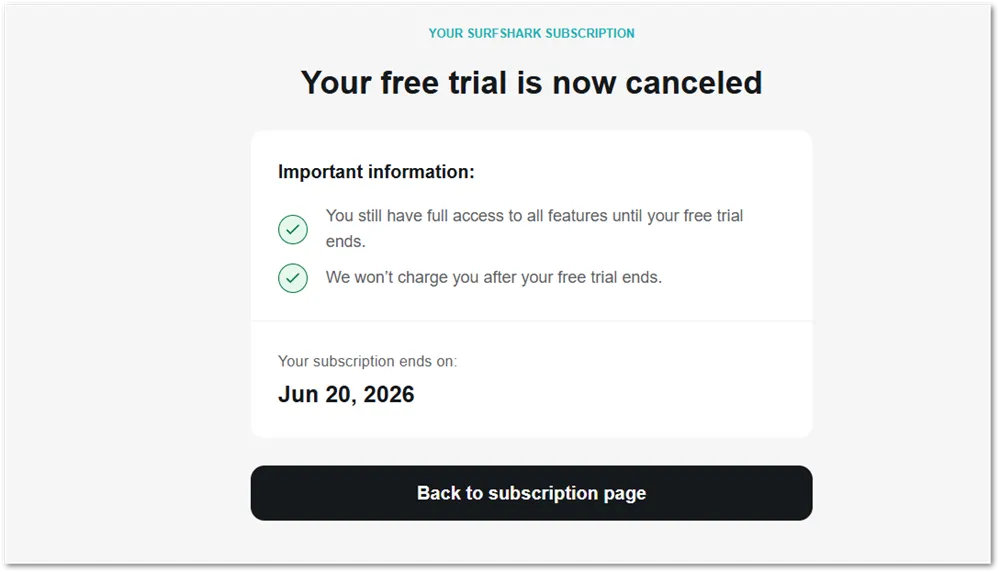
A confirmation screen will pop up to let you know that “your free trial is now cancelled”.
Canceling auto-renewal doesn’t end your access immediately — the subscription stays active until the end of the current billing period. So if you cancel on day 3, you still have access through day 7.
A few things to keep in mind:
- Cancel by day 6 at the latest. Don’t wait until the last few hours of day 7.
- Once the 7-day trial ends, the subscription automatically converts to a paid plan and your payment is processed according to the plan you selected at signup. There’s no grace period after that point.
- If you let it convert to a paid plan and then change your mind, you still have the 30-day money-back guarantee — giving you up to 37 days total to decide.
- If you need help at any point, Surfshark’s live chat is available 24/7 and handles cancellation questions quickly.
Is The Surfshark Free Trial Worth It?
For me, it was. After trying to access the 2026 FIFA World Cup games, I decided that the best stream would be BBC iPlayer and ITV which are UK broadcasters. Knowing that some VPNs aren’t able to unblock these streamers, I decided to take a free trial of Surfshark to see if that would work. It did – flawlessly.
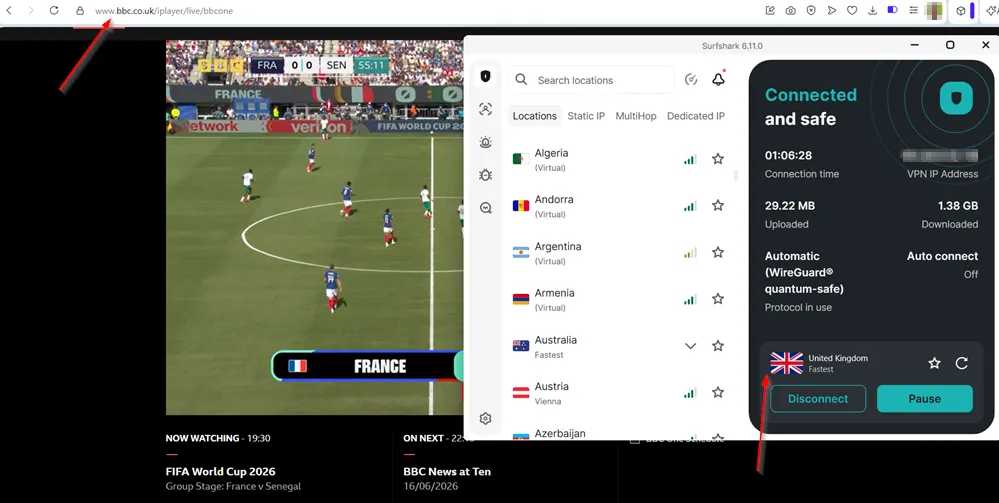
If you’re trying to access content that’s blocked in your country, Surfshark is one of the most reliable tools for the job — and the 7-day trial is a genuinely low-risk way to find out if it works for your specific situation.
Most VPNs make you commit first and ask questions later. Surfshark gives you a full week with the complete service before you spend anything. That’s enough time to connect to the servers you need, test it against the platforms you actually use, and decide whether it’s worth keeping — without any guesswork.
The pricing is competitive, the apps are easy to use across devices, and the streaming unblocking is as consistent as you’ll find at this price point. The trial being buried in the footer is a minor annoyance, but now that you know where to look, it takes seconds to find.
If it works for what you need it to do, the 2-year Starter plan at $2.49 per month is one of the better value propositions in the VPN space. If it doesn’t, cancel before day 7 and you’re out nothing.