
Most VPN reviews will tell you everything about a service except the one thing you actually need to know — does it work for what you’re trying to do?
I picked up Surfshark specifically to solve a streaming problem. I needed to access content that wasn’t available where I live, and I wanted something that would actually get through the blocks without constantly dropping the connection or buffering through every scene. I used it on desktop and on my phone, across multiple streaming platforms, and I’ve been using it long enough to have a real opinion on it.
This isn’t a spec-sheet rundown or technical analysis. If you want to know whether Surfshark is worth paying for, and whether it’ll hold up for your specific situation, that’s what this review is all about.
One thing worth knowing upfront: Surfshark offers a 7-day free trial that gives you full access before you spend anything. If you’re not ready to commit after reading this, that’s the logical next step. But if you’re already leaning toward a decision and just want confirmation, keep reading.
This post may contain affiliate links. TrialBear earns commissions at no extra cost to you when purchases are made through links on this page. For more info, visit the disclosure page.
Who Surfshark Is For
Surfshark isn’t trying to be everything to everyone, but it covers the three main reasons most people go looking for a VPN in the first place.
You want to access geo-restricted content.
This is the biggest one. If you’ve ever landed on a streaming platform and found that the show, match, or channel you’re looking for isn’t available in your country — or doesn’t exist on your regional version of the service at all — Surfshark is built for exactly that problem. It consistently unblocks major platforms across multiple regions, which puts it ahead of a lot of the competition.
This is the reason I got Surfshark — because I wanted to watch FIFA World Cup 2026 matches that weren’t available where I lived. I’d connect to a UK server and watch them on BBC and ITV.
You want to browse privately.
Whether you’re on public Wi-Fi, want to keep your internet activity away from your ISP, or just don’t love the idea of being tracked across every site you visit, Surfshark handles the privacy side without requiring you to understand how any of it works under the hood. The protection runs in the background and stays out of your way.
You want one subscription that covers everything you own.
Most VPNs charge per device or cap you at five or six connections. Surfshark puts no limit on simultaneous connections, so one subscription covers your laptop, phone, tablet, and anything else you’re running — without any juggling.
Where Surfshark isn’t the obvious first choice is if your primary concern is maximum privacy above all else, and you’re willing to pay more and accept some trade-offs in streaming performance to get it. There are VPNs built specifically around that use case. Surfshark sits in the middle — strong on privacy, excellent on streaming, easy to use, and priced accessibly.
Setup and First Impressions
Getting started with Surfshark is easy enough that you won’t need a tutorial. From the point where your payment is confirmed, you’re a few clicks away from your first connection.
The download is handled through your Surfshark dashboard after signup. You find your device, download the app, install it, and log in with the account you just created. On desktop it took me under five minutes including the install. Mobile was even faster — the app is available on both iOS and Android and the login is the same account credentials, so there’s no separate setup required.
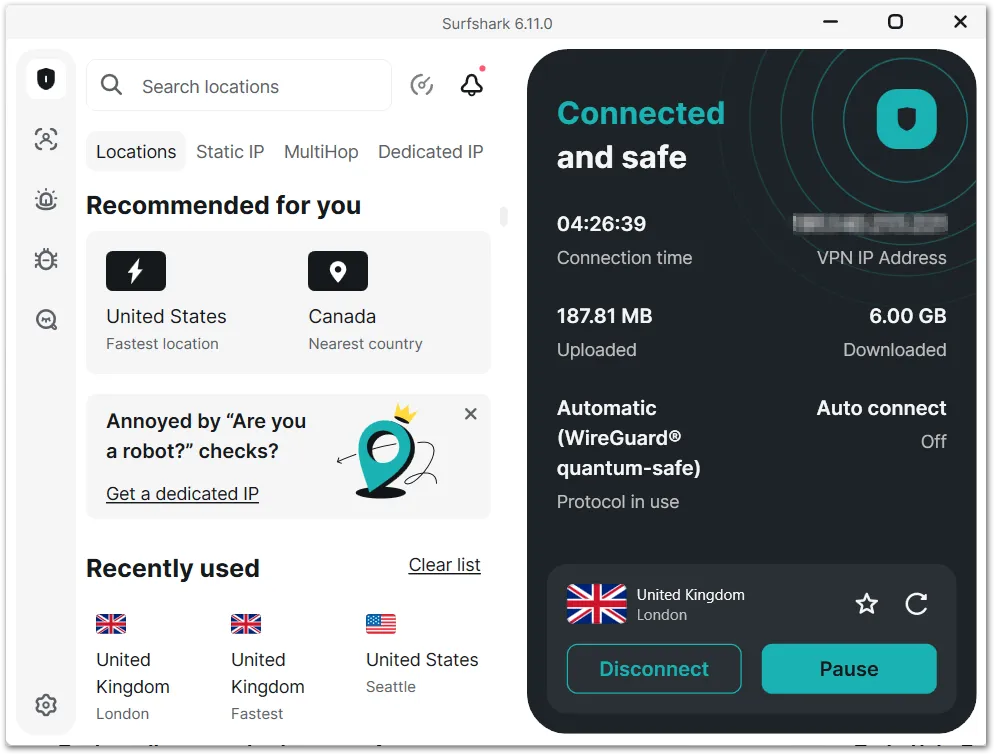
The desktop app opens clean. The main screen gives you a quick connect button and a server list — that’s essentially all you need to get started. If you want to dig into settings, they’re organized well enough that nothing takes long to find. But if you just want to connect to a server and go, you can do that in under a minute right from the start.
The mobile app follows the same layout, which matters more than it sounds. Some VPN providers treat the mobile app as an afterthought — stripped down, slower, missing features. Surfshark’s mobile app is a genuine version of the product. The interface is clean, connecting is fast, and the core features are all there.
First connection was smooth on both. No error messages, no failed attempts, no troubleshooting required. I picked a server location, hit connect, and it was done.
That’s about as much as you can ask from a first impression.
Surfshark’s Streaming Performance
This is where Surfshark earns its reputation, and it’s the main reason I picked it up in the first place.
I needed to watch 2026 FIFA World Cup games that weren’t accessible from my location. After looking at the options, BBC iPlayer and ITV were the best streams available. Both UK broadcasters were carrying all 104 games from the tournament (in English). The problem is that BBC iPlayer is one of the more aggressive platforms when it comes to blocking VPN traffic. A lot of VPNs that claim to unblock it either can’t get through consistently or drop the connection mid-stream. Surfshark got through without any issues and held the connection for the duration of the matches.
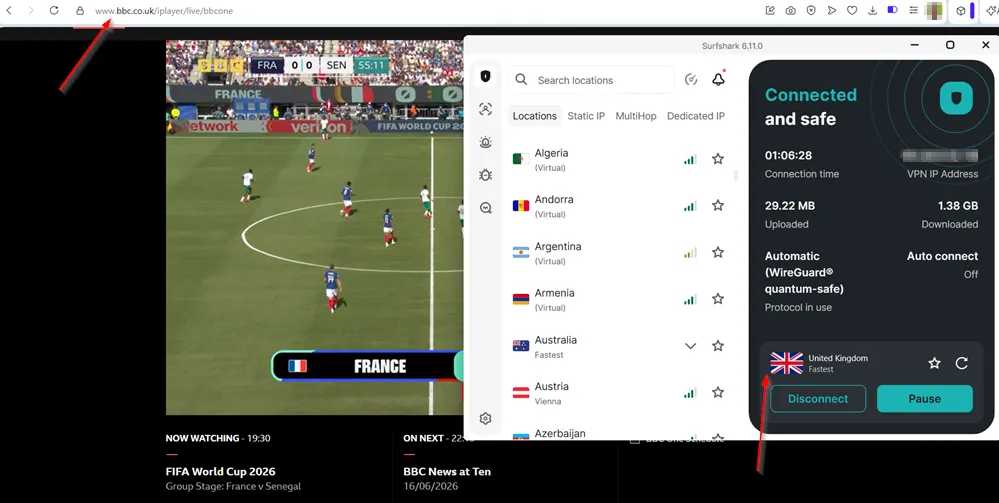
Beyond BBC iPlayer, I tested Netflix and Amazon Prime Video across different server locations. Both worked without any friction — no “you seem to be using an VPN” error pages, no being kicked back to a regional library when I didn’t want one. The connection stayed stable throughout.
The speed held up better than I expected too, including on longer distance connections. I connected to Australia’s SBS to catch the Iran vs. New Zealand game and there was no lag, no buffering, no quality drop. That’s a significant distance from my location and the stream ran cleanly the whole way through. WireGuard, the protocol Surfshark uses by default, is a big part of why — it’s built for speed in a way that older VPN protocols aren’t.
What I didn’t personally test: Surfshark claims to unblock Disney+, Hulu, HBO Max, and a range of other platforms. Based on what I did test, I have no reason to doubt it, but I can only speak directly to what I put it through myself.
If streaming is the main reason you’re looking at a VPN, Surfshark is one of the safest bets in the market right now.
Privacy and Security Features
Streaming performance is what draws most people to Surfshark, but the privacy and security side of the product is solid enough to be worth understanding — even if it’s not the primary reason you’re here.
Every connection runs through AES-256 encryption, which is the industry standard at the top level. In practical terms, it means your traffic is unreadable to anyone trying to intercept it — your ISP, anyone on the same network, or anyone else monitoring the connection.
The kill switch is one of the features I’d recommend turning on immediately regardless of what you’re using Surfshark for. If your VPN connection drops unexpectedly, the kill switch cuts your internet access entirely rather than letting your real IP address leak through in the gap. It’s the kind of thing you hope you never need but will be glad is there if you do.
CleanWeb is Surfshark’s built-in ad and tracker blocker. It works at the DNS level, which means it catches things that browser extensions miss — particularly on mobile, where ad blockers don’t work at the browser level the way they do on desktop. You turn it on once in settings and it runs quietly in the background.
MultiHop routes your connection through two servers in two different countries instead of one. The practical use case is situations where you want an additional layer of separation between your real location and your online activity. It’s not something most casual users will need, but it’s there if you do.
Camouflage Mode is worth knowing about if you’re ever on a network that actively tries to block VPN traffic — some workplace networks, certain countries, specific public Wi-Fi setups. It disguises your VPN connection to look like regular browsing traffic so it doesn’t get flagged.
Surfshark operates under a verified no-logs policy, meaning they don’t store records of your browsing activity, connection timestamps, or IP addresses. This has been independently audited, which puts it ahead of VPNs that make the same claim without any third-party verification.
I didn’t personally stress-test the privacy features the way I did the streaming performance. But the combination of AES-256 encryption, a verified no-logs policy, a kill switch, and Camouflage Mode covers what the vast majority of users actually need — and does it without requiring you to configure anything complicated.
Surfshark Speed and Reliability
A VPN that slows your connection to a crawl defeats the purpose, especially if you’re using it for streaming. Speed matters, and Surfshark holds up well in this aspect.
Some slowdown when using a VPN is normal — your traffic is being routed through an additional server, sometimes in another country, so there’s inherently some overhead involved. The question is how much, and whether it’s noticeable in practice. With Surfshark, it wasn’t. Day-to-day browsing felt the same as without the VPN running. Streaming held up across multiple platforms and server locations, including the Australia connection I mentioned in the streaming section — which is about as far a distance test as you can run from the Caribbean.
A lot of that comes down to WireGuard, the protocol Surfshark uses by default. It’s the most modern VPN protocol available and was built specifically to be faster and leaner than the older options like OpenVPN. Surfshark also offers IKEv2 and OpenVPN if you have a specific reason to switch, but for most people WireGuard is the right default and there’s no reason to change it.
On desktop the connection was stable throughout every session I ran. No drops, no reconnects, no moments where I had to check whether the VPN was still active. Mobile was the same — I could switch between Wi-Fi and mobile data without the connection falling over, which isn’t something every VPN handles gracefully.
Server selection also plays a role in speed. Surfshark’s network covers 100+ countries with 4,500+ servers, which means you’re rarely stuck with one overcrowded option for a given location. If one server feels slow, switching to another in the same country takes seconds and usually solves the problem.
For everyday use and streaming, the speed and reliability is genuinely not something you’ll find yourself thinking about — which is exactly where it should be.
Device and Platform Support
Surfshark runs on pretty much anything you’re likely to be using. Windows, macOS, Linux, iOS, Android, and browser extensions for Chrome and Firefox are all covered.
There’s also support for smart TVs, routers, and streaming devices like Fire TV and Apple TV if you want the VPN running at a broader level than just your phone and laptop.
I used it on desktop and mobile and the experience was consistent across both — same account, same server options, same core features. That matters because a VPN you only want to use on one device has limited practical value. Most people are switching between a laptop and a phone at minimum, and Surfshark handles that without any friction.
The unlimited simultaneous connections policy means there’s no ceiling to worry about. You’re not rationing connections across your devices or having to log out of one to use another. Everything runs under the same subscription.
One limitation worth mentioning: Surfshark dropped support for older versions of iOS and macOS in recent updates. If you’re running an older Apple device and haven’t updated the operating system in a while, it’s worth checking compatibility before you commit. Android and Windows users are unlikely to run into this issue.
Browser extensions are available for Chrome and Firefox and work as lightweight options if you just want to mask your location in the browser without running the full app. They’re more limited than the desktop app — no kill switch, fewer server options — but useful if you want something quick and low-overhead for browser-based streaming.
For the majority of users on current devices, platform support won’t be a consideration at all. It just works across whatever you’re running.
What Surfshark Does Well (Pros)
My experience with Surfshark was better than I had expected. For the pricing, I didn’t think it would have performed as good as other premium VPNs.
Here’s what I really liked about Surfshark.
✅ Streaming unblocking is genuinely reliable.
This is the headline. A lot of VPNs advertise streaming support and deliver it inconsistently — working one week, getting blocked the next.
Surfshark holds up. BBC iPlayer, Netflix, Amazon Prime Video, and SBS all worked without issues in my testing, including on platforms known for aggressively detecting and blocking VPN traffic.
If unblocking geo-restricted content is the reason you’re here, Surfshark delivers on that promise.
✅ The price-to-value ratio is hard to argue with.
At $2.49 per month on the 2-year Starter plan, you’re getting a full-featured premium VPN at a price that undercuts most of its direct competitors. NordVPN, which is the most common comparison point, runs noticeably higher for a similar feature set.
The gap between what Surfshark costs and what it gives you is one of its strongest selling points.
✅ Unlimited device connections on one subscription.
Most VPNs put a cap on this — usually five or six simultaneous connections. Surfshark doesn’t. One subscription covers everything you own without any juggling or prioritizing which devices get protection.
✅ The apps are genuinely easy to use.
Setup takes minutes, the interface is clean on both desktop and mobile, and you don’t need to understand how a VPN works to use one effectively. For someone coming to a VPN for the first time, the learning curve is minimal.
✅ Speed holds up where it counts.
Long-distance connections included. The Australia test was the most demanding thing I put it through and it ran cleanly. For streaming and everyday use, the speed is a non-issue.
✅ The 7-day free trial removes the risk from the decision.
You can test everything covered in this review against your specific situation before spending anything. That’s not something every VPN offers, and it’s worth taking advantage of before committing to a paid plan. You can read more about the Surfshark free trial here.
Where Surfshark Falls Short
Let’s not pretend that Surfshark is perfect. There are some issues that may or may not be dealbreakers. Most of them aren’t.
❌ The renewal pricing jump is significant.
Surfshark’s promotional rates are genuinely good — but they only apply to your first billing cycle. When your plan renews after 12 or 24 months, the price goes up noticeably.
The Starter plan renews at $79 per year, and One renews at $99 per year. It’s something every major VPN does, but it’s worth factoring into your decision upfront rather than being caught off guard at renewal time. The 2-year plan softens this by locking in the promotional rate for longer.
❌ The free trial isn’t easy to find.
For a feature this useful, it shouldn’t require a scroll to the bottom of the footer to locate. New visitors to the Surfshark website have no obvious indication that a free trial even exists. It’s there — and I’ve covered exactly how to find it — but it’s a missed opportunity on Surfshark’s part that could cost them conversions from people who assume there’s no way to try before buying.
❌ Older Apple devices aren’t supported.
Surfshark has dropped support for older versions of iOS and macOS. If you’re on an older Apple device and haven’t kept up with OS updates, you may find the app won’t run. Android and Windows users are unlikely to hit this issue, but it’s worth checking before you commit if you’re in that situation.
❌ Some features go untested in real-world use.
MultiHop, Camouflage Mode, and Alternative ID are all included in the subscription, but they’re features most casual users will never touch. If you’re coming to Surfshark specifically for advanced privacy features and want hands-on verification that they perform as advertised, you’ll find more thorough technical breakdowns elsewhere. For streaming and general use, it’s not a factor — but I’m being upfront about it.
How Much Does Surfshark Cost?
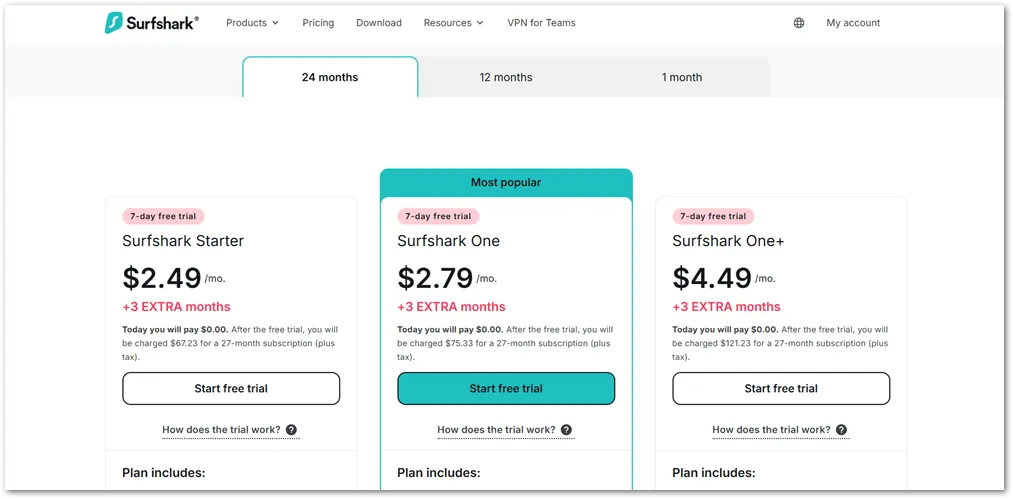
Surfshark keeps the plan structure simple. Three tiers, three billing cycles, and the price difference between them is small enough that the decision usually comes down to whether you want the extras rather than whether you can afford them.
Surfshark Starter is the core VPN — everything covered in this review, unlimited devices, full streaming and privacy features, nothing else bundled in.
The 2-year plan costs $2.49 per month, the 1-year plan is $3.39 per month, and the monthly plan is $16.45. For most people reading this, Starter is all they need.
Surfshark One adds antivirus protection, a private search tool, and Surfshark Alert — a monitoring tool that notifies you if your email addresses, passwords, or credit card details show up in a data breach. It starts at $2.79 per month on the 2-year plan. The jump from Starter to One is small enough that if any of those additions appeal to you, it’s worth taking.
Surfshark One+ adds Incogni on top of everything in One — a data removal service that contacts data brokers on your behalf to get your personal information pulled from their databases. It starts at $4.49 per month on the 2-year plan. It’s the full bundle, and the right pick if data privacy beyond just your browsing activity is a concern.
A few things to keep in mind across all plans:
The promotional rates above apply to your first billing cycle only. After that, Surfshark renews at the standard rate — $79 per year for Starter and $99 per year for One. The 2-year plan locks in the lower rate for longer, which is why it tends to be the better deal if you’re already confident Surfshark is the right fit.
Surfshark regularly runs promotions that bundle in extra months — currently three extra months free on 1-year and 2-year plans. Check the site at the time you sign up since these change periodically.
The free trial is available on the 1-year and 2-year plans only, paid by credit card or PayPal. If you want to test before committing, that’s the path — and it’s the one I’d recommend before deciding between plans.
How Does Surfshark Compare To Other VPNs?
Surfshark comes up in almost every VPN comparison conversation right now, mostly because it punches above its price point.
Here’s how it sits against the three names you’re most likely weighing it against.
| Surfshark | NordVPN | ProtonVPN | PIA | |
|---|---|---|---|---|
| 2-year price | $2.49/mo | $3.49/mo | $2.99/mo | ~$2.03/mo |
| Device connections | Unlimited | 10 | 10 | Unlimited |
| Free trial | 7 days | 3 days (Android only) | Free tier available | 30-day guarantee only |
| Streaming unblocking | Excellent | Excellent | Good | Moderate |
| Best for | Streaming + value | Overall performance | Privacy first | Privacy + budget |
| Money-back guarantee | 30 days | 30 days | 30 days | 30 days |
Surfshark vs. NordVPN
NordVPN‘s 2-year plan starts at $3.49 per month, which is a dollar more per month than Surfshark. It’s not a huge gap by itself, but it adds up over a 2-year commitment.
NordVPN caps simultaneous connections at 10 devices, while Surfshark has no limit. In terms of streaming performance, they’re close — both consistently unblock the major platforms. NordVPN has a slight edge in raw server count and overall reputation, but for most users the day-to-day experience won’t feel different.
The practical win for Surfshark is the 7-day free trial. NordVPN only offers a 3-day trial on Android and a 30-day money-back guarantee for everyone else, which means you have to commit upfront to test it properly.
Surfshark vs. ProtonVPN
ProtonVPN is the stronger pick if privacy is your primary concern, with Swiss-based servers and a reputation built around security above all else.
The best deal on ProtonVPN comes in at $2.99 per month on a 2-year plan — slightly more than Surfshark. The bigger differentiator is that ProtonVPN offers a genuinely unlimited bandwidth free tier, which is worth knowing if you want to try a VPN without entering any payment details at all.
Where Surfshark pulls ahead is streaming reliability and unlimited device connections — ProtonVPN limits paid plans to 10 simultaneous connections. And based on my own experience, its streaming unblocking, while solid, isn’t quite as consistent as Surfshark’s across all platforms.
Surfshark vs. Private Internet Access (PIA)
PIA’s 2-year plan works out to around $2.03 per month when factoring in the bonus months currently on offer, making it the cheapest option in this comparison.
Like Surfshark, it offers unlimited simultaneous connections and has a strong verified no-logs policy. Where Surfshark has the clear edge is streaming, PIA is solid for privacy and general use but isn’t as reliably effective at unblocking geo-restricted content.
If streaming is the main reason you’re here, that difference matters. PIA is also worth checking compatibility on if you’re running an older Apple device, since Surfshark has dropped support for older iOS and macOS versions.
The bottom line on comparisons
NordVPN is the better overall VPN on paper. ProtonVPN is the better choice if privacy comes before everything else. PIA wins on price.
But Surfshark is the one that hits the streaming use case most consistently, covers unlimited devices, and lets you test the full product free for 7 days before spending anything. For most people reading this review, I think that combination is hard to beat at the price.
Trial Bear Verdict on Surfshark
Surfshark is one of the easiest VPN recommendations I can make for someone whose primary use case is accessing geo-restricted streaming content. I came to it with a specific problem (content I couldn’t access from my location) and it solved that problem cleanly and consistently across every platform I tested it on.
Netflix, Amazon Prime Video, BBC iPlayer, and SBS all worked without friction, including on long-distance connections where speed could have been an issue.
The price makes the decision easier. At $2.49 per month on the 2-year Starter plan, you’re getting a premium VPN that outperforms services charging significantly more. The unlimited device connections, clean apps on both desktop and mobile, and the 7-day free trial that lets you verify it works for your situation before spending anything — all of that adds up to a service that’s genuinely hard to argue against at this price.
The renewal pricing jump is the one thing worth going in clear-eyed about. The promotional rate doesn’t last forever, and the standard renewal rate is noticeably higher. Factor that in when choosing between the 1-year and 2-year plans — the 2-year locks in the better rate for longer, and if Surfshark does what you need it to do, that’s the better long-term value.
If you’re still deciding, the 7-day free trial is the right next step. Test it against the exact platform you’re trying to unblock, on the devices you actually use, before you commit to anything. If it works — and based on my experience it will — the paid plan is worth keeping.
Get Surfshark — Start with a 7-day free trial →
Full access during the trial. No charge for 7 days. Cancel anytime before the trial ends and you won’t be billed.