This post may contain affiliate links. TrialBear earns commissions at no extra cost to you when purchases are made through links on this page. For more info, visit the disclosure page.
GroupApp is a community platform that allows you to bring your audience together with courses to form a learning community.
Having courses and community in one place can boost retention, improve member success, and increase membership and course sales. If you’re a course creator interested in a community-first approach to selling courses then you may like what GroupApp offers.

GroupApp has a lot of features that make it a viable alternative to Facebook groups and other social media community platforms.
Notable features include:
- rich discussions
- member profiles
- events calendar
- courses / cohort-based courses
- direct message and group chat
- community channels
- library
- Single sign-on
- API and Zapier integration
- email marketing
To get started with GroupApp, you have two choices – a free account which you can use with no time limits and doesn’t need a credit card to get started, or a 14-day free trial of any paid plan.
The 14-day free trial allows you to test the paid features for a limited time. You can’t test paid features while on a free plan, so it’s best to start with a 14-day free trial and then transition to the free account when your trial expires.
Plans start at $24/month and go up to $384/month. There is a 25% discount when you choose annual billing. Each plan has limits on how many members and channels you can have, so as your community grows, you can move up to a plan that fits.
In this article, I’m going to show you how easy it is to get started with GroupApp and what you can expect when signing up.
Signing Up for a GroupApp Free Trial
There are two ways to sign up for a GroupApp account to start building your community and courses.
- Create a free account – no credit card is necessary and there are no time limits.
- Get a 14-day free trial – you’ll need to enter your credit card but you’ll get to try a paid plan and features.
If you need to try out the paid features then your starting point should be with a free trial. You can always cancel and stay on the free account.
On the homepage of the GroupApp website, you’re pointed towards creating a free account.
To start with the free trial, you’ll need to go to the pricing page, look at the plans and click on the “Start 14-day trial” button to sign up.
Here’s what happens during the signup process.
1. Fill in the signup form

The very first step is to fill in the signup form. You’ll need to enter your full name, email address and create a password. Then just check the box to agree to the TOS and Privacy Policy before clicking the button to create your account.
2. Verify your account

After creating your account, GroupApp will send a message to the email address you signed up with containing a 6-digit code.
Retrieve the code from your email and fill it in here to verify your account.
3. Enter details to create your community
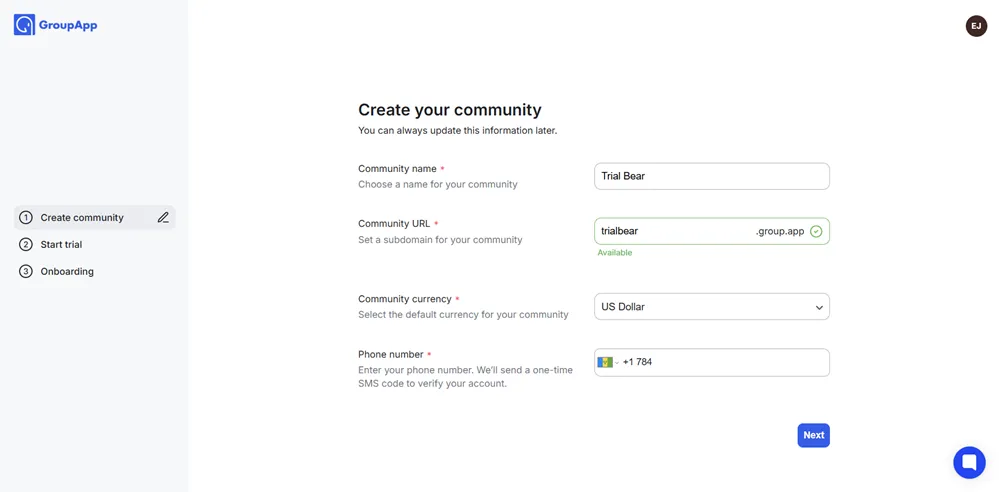
Next, you’ll be asked to enter details to create your community. These details include the name of your community, your subdomain url, and your currency. You’ll also be asked for a phone number to verify your account.
All of these options can be changed later in your admin settings and you can get a custom domain so you don’t have to use a group.app subdomain.
4. Choose a plan to free trial
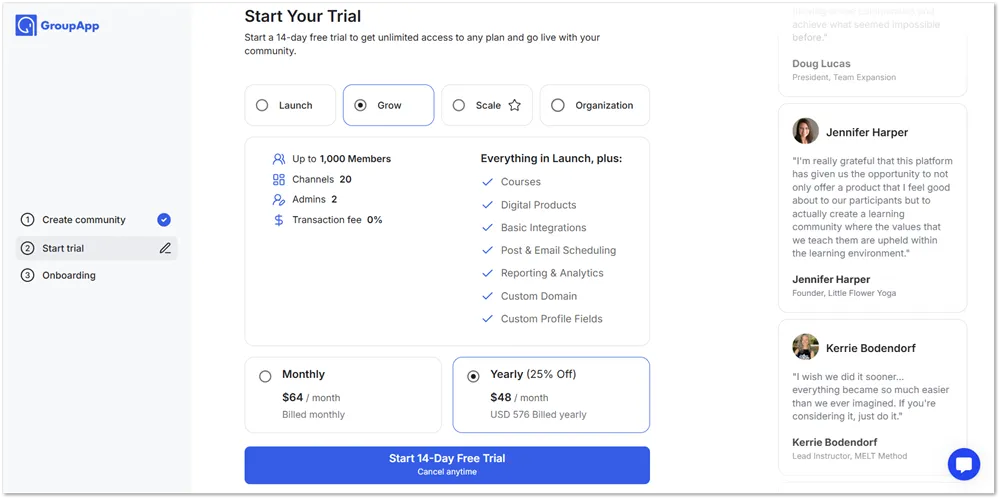
Once you’re done setting up your community and verifying your account by phone, it is time to pick a plan to free trial.
You can choose between four paid plans and also choose between monthly and yearly billing.
Although the Scale plan is the recommended plan, I chose the Grow plan to free trial because it includes courses along with some reasonable allowances. You can start with any plan including Launch – this can be changed at any time during the trial to the plan you would like to continue with.
5. Enter your billing details
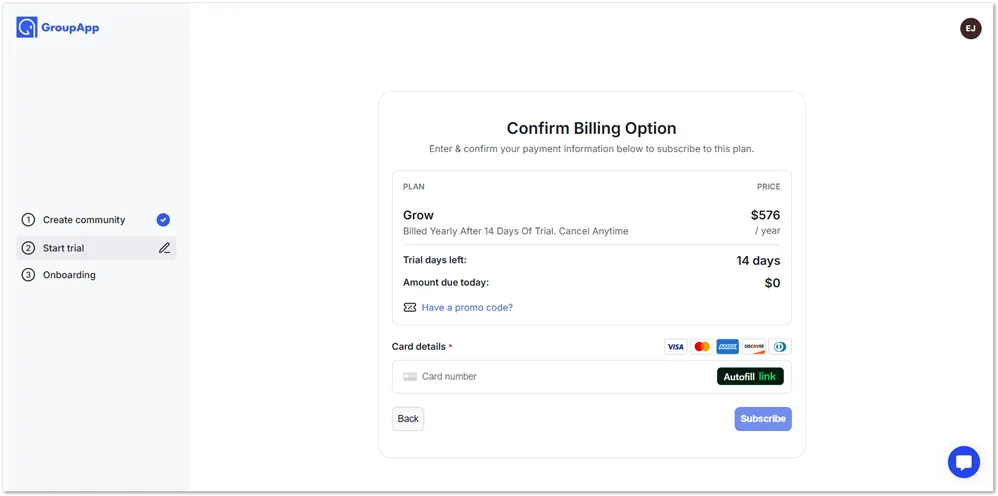
After confirming the plan that you wish to free trial, you’ll be asked to enter your credit card information. This is so that they can automatically bill you when your free trial is over. You can cancel at any time and still enjoy any days remaining in your trial.
There was no PayPal option available so you’ll need to enter a credit or debit card to start.
If you have a promo code, then this would be the best time to enter it and get your discount.
6. Quick onboarding questions

The signup is complete but you’ll have to answer some quick onboarding questions before you’re shown the dashboard.
The first one is about migration and the options are that you’re just starting out and you’re moving from another platform.
Other questions asked seek to find out about:
- audience size
- creator type – blogger, YouTuber etc
- your goal – earn from courses, grow membership community etc
Finally, they want to know how you heard about GroupApp. I heard about them after Googling to do research on Skool which is a similar community platform.

Finally, you’re sent to the dashboard where you can watch a video walk-through from the site’s creator, Dornubari Vizor.
What You Get On a GroupApp Free Trial
Since you get to choose which plan you want to free trial, what you get depends on the features offered on your plan of choice.
GroupApp recommends that you start with the Scale plan. This plan covers all the core features and gives you a lot of room to set up your community, build your courses, and start bringing in members. Here’s what you can do on the Scale plan during your trial:
- Set up your community
- Add up to 50 community channels
- Create unlimited courses
- Create events
- Schedule posts and emails
- Drip feed your courses
- Segment your audience
- Allow single sign-on
- Zapier integration
- Remove GroupApp branding
- Group chat and direct messaging
None of the paid plans charge transaction fees, which is one of the better reasons to start with a free trial rather than the free account – you get to build and sell without any cuts taken from your revenue during the trial period.
Should You Use GroupApp?
GroupApp has a very easy to use interface for creating a learning community. The course builder can be a bit clunky at first but you can get used to it after you’ve created your first course. Despite that, GroupApp is still a good option for course creators.
The platform takes a community-first approach, which means your members are more likely to complete your courses, stick around longer, and feel like they’re part of something rather than just consuming content alone.
GroupApp may not have all the features of more established platforms like Mighty Networks or Circle, but it has grown considerably and now includes Android and iOS mobile apps so your members can stay connected on the go. Native live streaming isn’t available yet, but for most learning communities that’s not a dealbreaker.
Each plan has clear limits on members and channels, so you’ll know exactly when it’s time to upgrade. The Launch plan at $24/month is an accessible way to get started, and the pricing scales in a predictable way as your community grows.
The best way to know if GroupApp is right for you is to try it yourself. Start with the 14-day free trial and see how the platform fits what you’re building.