If you’ve been looking into platforms for selling online courses or digital products, there’s a good chance Podia has come up.
It’s one of the more popular all-in-one options out there, and for good reason. It lets you sell courses, digital downloads, coaching, webinars and memberships all from one place without needing a bunch of separate tools to make it work.
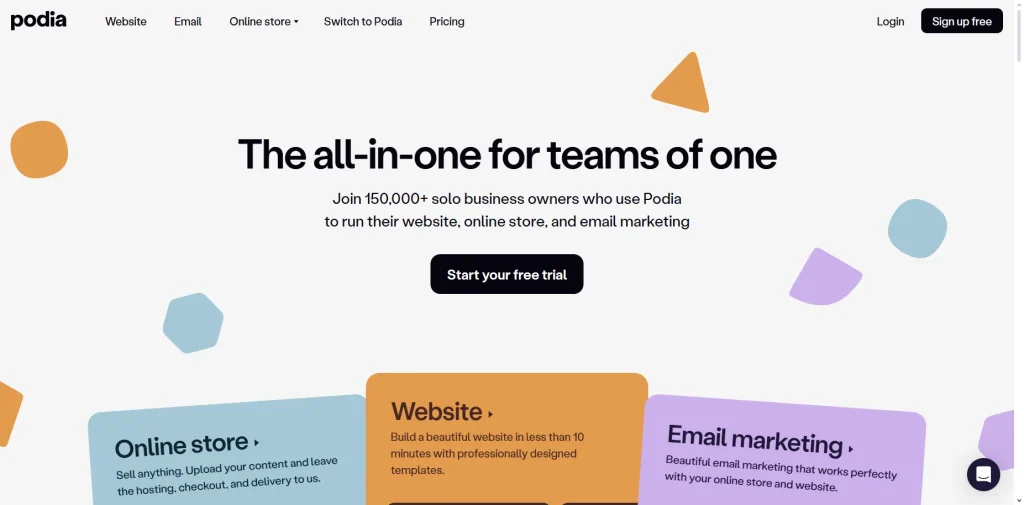
I first tested Podia a few years back when they were running a free plan instead of a free trial. They’ve since made some changes, so I went back and tested it again to see where things stand. A lot has changed, and the 30-day free trial is one of the bigger ones.
No credit card is required either. That’s enough time to actually set something up, explore the features and figure out whether it’s the right fit before you pay anything.
This isn’t a full review of Podia – if you want that, I’ve got one here.
What this is, is a breakdown of everything you need to know about the free trial specifically. What you get access to, what to watch out for, how to make the most of your 30 days and what happens when the trial ends.
By the time you’re done reading, you’ll know exactly what you’re signing up for.
This post may contain affiliate links. TrialBear earns commissions at no extra cost to you when purchases are made through links on this page. For more info, visit the disclosure page.
Podia Verdict & Rating
Rating: 4/5 Bears 🐻🐻🐻🐻🐻❄️
Quick Verdict:
Podia offers one of the most generous free trials in its category – 30 days, no credit card required, and full access to every feature so you can properly evaluate the platform before spending a dime.
Standout Indicators
✅ 30-day trial – longer than most competitors
✅ No credit card required to start
✅ Full feature access during the trial
❌ Identity verification required after signup
❌ Mover plan carries a 5% transaction fee after trial
❌ No PayPal or affiliate marketing on the entry plan
Quick Take
If you’re looking for a budget-friendly all-in-one platform to sell courses, downloads or memberships, Podia is worth your time to try. The 30-day window gives you enough time to build something real and see how everything works before you commit.
Who Is Podia Best For?
Podia is built for independent creators who want to sell their knowledge or content online without dealing with a complicated setup or paying for multiple subscriptions.
If any of these sound like you, it’s worth exploring:
You’re a course creator who wants to build and sell online courses without the steep learning curve that comes with some of the bigger platforms. Podia keeps things simple without stripping out the features you actually need.
You sell or plan to sell digital downloads – ebooks, templates, presets, audio files, spreadsheets – alongside or instead of a course. Not every platform handles this well. Podia does.
You’re a coach or consultant who wants to offer coaching sessions or book consultations directly through your own website without bolting on a separate scheduling tool.
You’re a blogger, YouTuber or content creator who already has an audience and wants a straightforward way to monetize it with a course, a membership or a digital product.
You want everything under one roof. Podia replaces your course platform, email marketing service, website builder and affiliate tracking tool in one subscription.
Who might want to look elsewhere
If you need advanced website customization or the ability to edit your site’s code directly, Podia’s website builder will feel limiting. It’s clean and easy to use but it doesn’t give you that level of control.
If affiliate marketing is a priority from day one, keep in mind that it’s only available on the Shaker plan at $89/month. It’s not something you can access on the entry-level Mover plan.
And if you’re coming from a platform with a heavy community focus – like Mighty Networks or Skool – Podia’s community feature covers the basics but isn’t going to match the depth of a platform built around community first.
What You Get On a Podia Free Trial
One of the better things about Podia’s free trial is that it isn’t a watered-down preview. You get full access to everything on the platform for 30 days, which means you can actually build and test your products properly rather than hitting a wall every time you try to explore a feature.
Here’s what you can get into during your trial:
Courses
You can build out a full online course during your trial – add sections, lessons, text, files, embeds and quizzes. You can set pricing, configure availability and publish it.
Everything you’d need to see how the course builder works end to end is available from day one.
Digital Downloads
You can upload and set up digital products – ebooks, templates, audio files, PDFs, spreadsheets and more. You can configure pricing and have a fully functional product ready to sell before your trial is up.
Coaching
You can set up coaching products and configure booking during the trial. If coaching is part of what you plan to offer, you’ll have enough time to test how it works and whether it fits the way you work.
Webinars
You can set up and publish webinars during the trial using either YouTube Live or a connected Zoom account. If you plan to host live sessions as part of your offer, you can test this properly during your 30 days.
Community
You can create and launch a community during the trial, set up discussions, configure access and see how the member experience looks. It won’t take long to get a feel for whether Podia’s community tool is enough for what you need.
Website and Email Marketing
The website builder and email marketing tools are fully accessible during the trial. You can build out your site, set up email forms, send broadcasts and explore automations.
These are core parts of the platform and you’ll get a proper look at both.
What’s limited or excluded
The trial gives you access to all features, but a couple of things are worth knowing before you get too deep into setup.
Affiliate marketing is only available on the Shaker plan. You can explore the affiliate section during your trial, but when it comes time to choose a plan, you’ll need Shaker at $89/month to actually run an affiliate program.
PayPal is also Shaker-only. If you plan to offer PayPal as a payment option for your customers, that’s something to factor into your plan decision before the trial ends.
And while you can sell during the trial, keep in mind that once you move to a paid plan, the Mover plan carries a 5% transaction fee on every sale. The trial is a good time to think about which plan makes more sense for your situation before you commit.
Hidden Gotchas for Podia Free Trial
Every platform has fine print worth knowing before you commit. Podia’s trial is genuinely one of the better ones out there, but there are a few things that can catch people off guard if they don’t know about them going in.
Identity verification is required after signup
This one caught me by surprise. You don’t need a credit card to start the trial, but after you confirm your email address your account will be locked until you verify your identity.
Podia does this through a QR code. You scan it with your phone, which takes you through a process of photographing a government-issued ID.
It’s not a long process but it’s unexpected if you’re not prepared for it. If you sign up and suddenly find your account isn’t accessible, this is why. Just complete the verification and you’re good to go.
Initially, I thought it was there to prevent multiple signups for their “no credit card” free trial. However, the verification seems to be done by Stripe so it’s possibly a Stripe verification so that you can prepare your account for selling.
The Mover plan’s 5% transaction fee
There are no transaction fees during the trial, but once it ends and you move to a paid plan, the Mover plan charges 5% on every sale you make. That fee is on top of the standard payment processing fees charged by Stripe.
To put that in real terms, if you’re selling a $100 course, Podia takes $5 before Stripe takes their cut. That adds up quickly once you’re generating consistent sales. The Shaker plan at $89/month removes the transaction fee entirely, so depending on your sales volume, upgrading can actually save you money.
PayPal is not available on the Mover plan
If you want to offer your customers the option to pay with PayPal, that’s only available on the Shaker plan. It’s worth knowing before you set up your checkout and wonder why PayPal isn’t showing up as an option.
Affiliate marketing is Shaker-only
If you’re planning to recruit affiliates to help promote your products, you won’t be able to activate that feature on the Mover plan. You can explore the affiliate section during your trial but you’ll need to be on Shaker to actually use it after the trial ends.
Auto-renewal
When your 30-day trial ends you’ll need to choose a paid plan to continue using Podia. Unlike some platforms that automatically charge you at the end of a trial, Podia will prompt you to select a plan.
That said, it’s always good to have a reminder set a few days before your trial ends so you’re not making a rushed decision.
Getting The Most Out of Your Podia Free Trial
Thirty days is more time than most platforms give you, but it can still go fast if you don’t have a plan going in.
Here’s how to make the most of it.
Get the verification out of the way first
Before you do anything else, complete the identity verification. It only takes a few minutes once you have your ID handy, and it means you won’t hit a wall right when you’re trying to get started.
Don’t leave it sitting. Just knock it out immediately after confirming your email.
Set up a real product, not a placeholder
The best way to evaluate any platform is to use it for something real.
Pick one product you actually plan to sell – a course, a digital download, a coaching offer – and build it out properly during the trial. You’ll get a much more accurate sense of how Podia works when you’re doing real work in it rather than just clicking around.
Test the checkout experience as a customer
Once you’ve set up a product, go through the checkout process yourself. Set your product to free temporarily and run a test purchase so you can see exactly what your customers will experience.
This is something a lot of people skip during a trial and then wish they’d done earlier.
Explore the email marketing tools early
Podia’s built-in email marketing is one of the features that can genuinely replace a separate subscription. Set up an email form, run a test broadcast and look at the automation options.
If you’re currently paying for a separate email service, this alone could justify the switch.
Build a page of your website
Even a basic sales page.
The website builder is intuitive but every builder has its own logic and quirks. Giving yourself time to get comfortable with it during the trial means you won’t be learning it under pressure after you’ve committed to a paid plan.
Check out the community feature
Even if community isn’t your immediate priority, spend twenty minutes setting one up and looking at it from a member’s perspective.
It’s worth knowing whether it meets your needs before you’re locked into a plan and realize you need a separate tool for it.
Make your plan decision before day 25
Don’t wait until the last day to decide between Mover and Shaker. By day 25 you should have a clear enough picture of which features you’ll actually use.
Run the numbers on the transaction fee. If you expect to make consistent sales, do the math on whether Shaker pays for itself.
Give yourself a few days to think it through rather than making a rushed call at the end.
How To Sign Up for the Podia Free Trial
Getting started with Podia is surprisingly fast. The whole process from landing on their site to being inside your account takes less than five minutes, not counting the identity verification step, which adds a little time depending on how quickly you have your ID to hand.
Here’s how it goes:
Step 1: Go to the Podia website
Head to Podia.com and click the “Start your free trial” button. It’s hard to miss.
Step 2: Enter your details
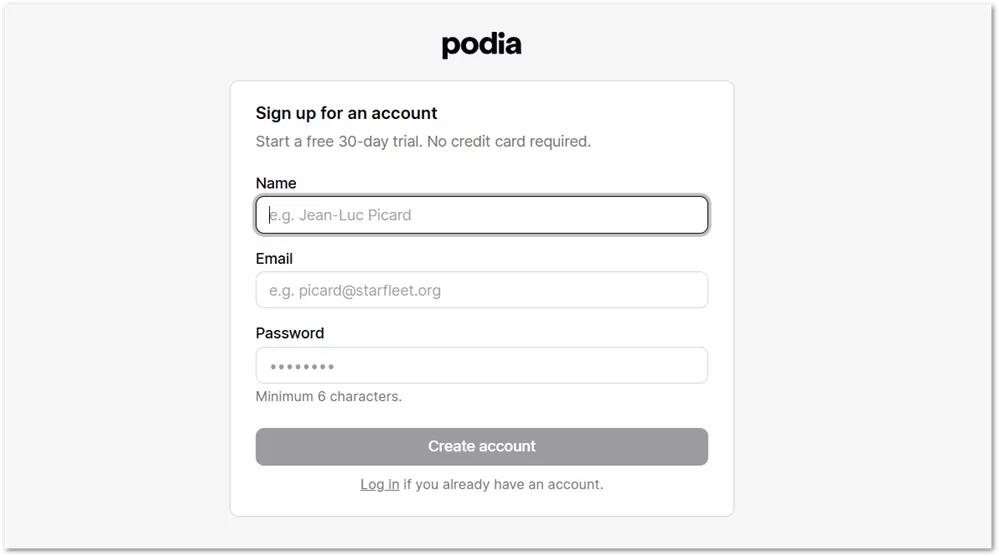
You’ll be asked for your name, email address and a password. No credit card information is required at this stage.
Step 3: Confirm your email
After you hit the “Create account” button in the previous step, you’re immediately taken to your dashboard. You can preview the interface quickly.
Podia will send a confirmation email to the address you signed up with. Click the link inside to verify your email and continue.
Step 4: Complete identity verification
This is the step that catches people off guard.
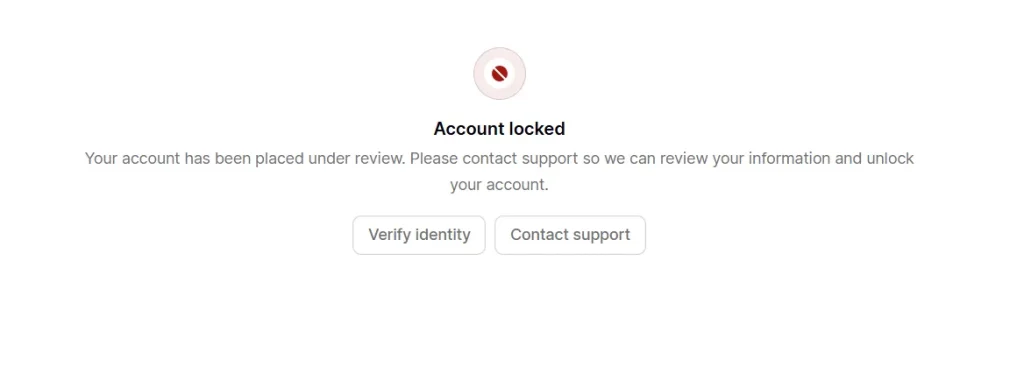
After email confirmation your account will be locked until you verify your identity. Podia will present you with a QR code. Scan it with your phone and you’ll be walked through a process of photographing a government-issued ID such as a passport or driver’s license.
For me the process was a bit frustrating – I was asked to retake the photos for clarity twice. In the end, I had to upload an scan of my driver’s license that I had on my phone.
Your experience may be different and should only take a few minutes once you have your ID ready.
Step 5: Onboarding
Once verification is done you’ll be sent a welcome email which then takes you through a brief onboarding process.
You’ll be given a 5-step walkthrough of what Podia can help you accomplish. Don’t skip this step. I learned a lot right here before I even started going through the Podia interface myself.
Step 6: You’re in
Your dashboard is ready and your 30-day trial clock starts from here. You have full access to every feature from this point.
How Podia Compares To These Alternatives
If you’re checking out Podia, there’s a good chance you’re also looking at a few of the other big names in the space.
Here’s how Podia stacks up against the platforms people most commonly compare it to.
1. Thinkific
Thinkific is probably the closest comparison to Podia in terms of who it’s built for. Both platforms target independent creators who want to sell courses without paying Kajabi prices, and both are genuinely easy to use.
The main differences come down to product range and transaction fees. Thinkific doesn’t support digital downloads, webinars or coaching products natively the way Podia does, so if you plan to sell anything beyond courses and memberships, Podia gives you more flexibility out of the box.
On the other hand, Thinkific charges 0% transaction fees on all its paid plans — something worth factoring in if you’re leaning toward Podia’s Mover plan with its 5% fee.
Both platforms offer a 30-day free trial, though Thinkific requires a credit card to start while Podia doesn’t. Plans start at $49/month on Thinkific compared to $39/month on Podia’s Mover plan.
2. Teachable
Teachable and Podia cover similar ground – courses, coaching and digital downloads in one place, with a native community feature on both. They’re priced similarly too, with Teachable’s Starter plan at $39/month matching Podia’s Mover plan.
The biggest practical difference for most people is the trial. Podia gives you 30 days while Teachable’s trial runs for just 7 days. If you’re someone who needs time to properly build something out and evaluate before committing, that gap matters.
Teachable’s Starter plan also carries a 7.5% transaction fee compared to Podia’s 5% on the Mover plan. Neither is ideal, but Podia’s fee is lower at the entry level.
3. LearnWorlds
Learnworlds is a strong alternative if interactive video and a more flexible website builder are priorities for you. It goes deeper on the course experience side – think interactive video, assessments and a polished student interface – and the drag-and-drop website builder gives you more design freedom than Podia’s editor.
The trade-off is cost and complexity. Learnworlds starts at $29/month but charges a $5 fee per course sale on the Starter plan, which can add up fast. The Pro Trainer plan at $99/month removes that fee but is more expensive than Podia’s Shaker plan at $89/month.
Learnworlds offers a 30-day free trial with no credit card required, matching Podia on both counts. If you want a more feature-rich course experience and don’t mind a steeper learning curve, it’s worth putting on your shortlist.
4. Kajabi
Kajabi and Podia are both all-in-one platforms but they’re aimed at very different budgets.
Kajabi’s entry plan starts at $179/month, more than four times Podia’s Mover plan. For that price though, you get a more powerful email marketing and automation system, more polished templates and a stronger overall marketing toolkit.
If budget isn’t a constraint and you want the most fully-featured platform available, Kajabi is worth considering. But for most independent creators just starting out or working within a budget, the price difference is hard to justify when Podia covers the core needs at a fraction of the cost.
Kajabi offers a 14-day free trial compared to Podia’s 30 days, and a credit card is required to start. On the trial length alone, Podia gives you more time to evaluate properly.
Podia Pricing After the Free Trial
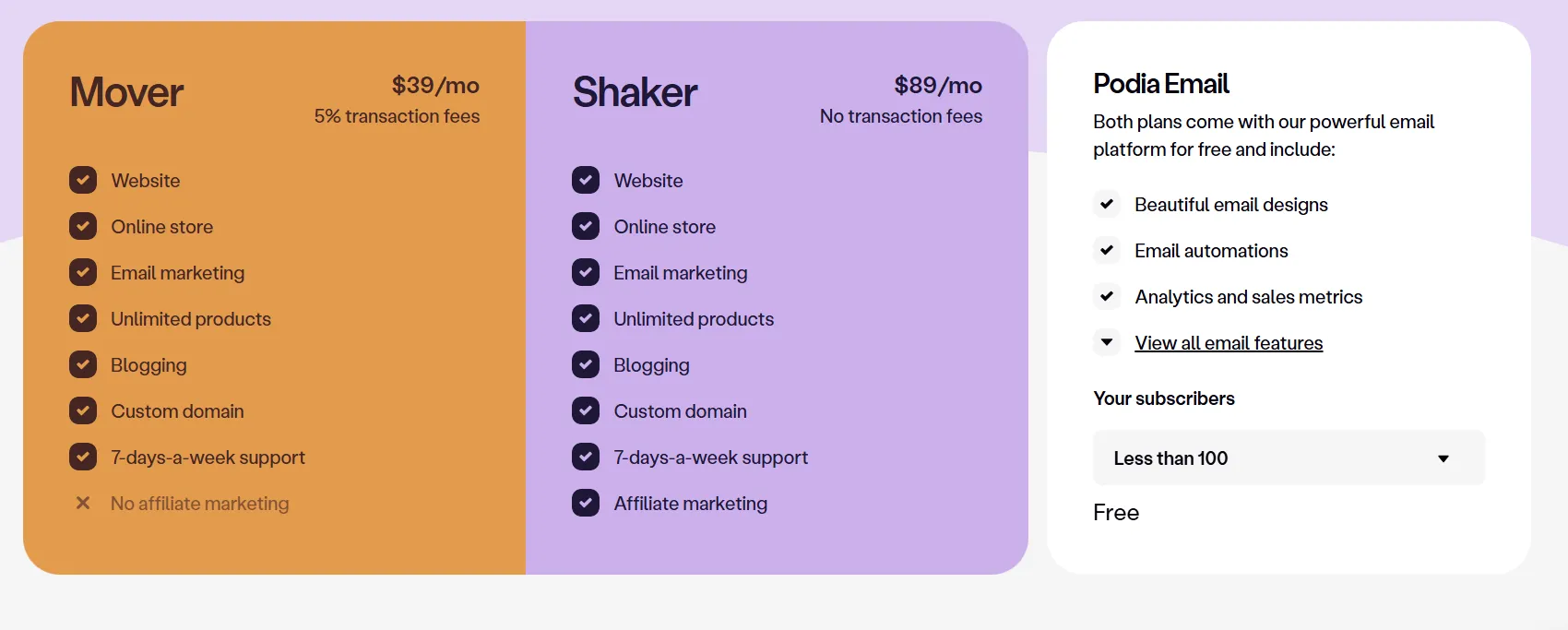
Once your 30-day trial ends, you’ll need to choose one of Podia’s two paid plans to keep your account active.
Here’s what each one looks like.
Mover – $39/month ($33/month billed annually)
The Mover plan is the entry point and covers everything most creators need to get started. You get a full website with blogging, unlimited products, online courses, digital downloads, coaching, webinars, community, email marketing, coupons, custom domain and seven-days-a-week support.
The main thing to be aware of on this plan is the 5% transaction fee on every sale. Stripe is the only payment processor available on Mover – PayPal isn’t supported at this tier. Affiliate marketing is also not included.
If you’re just starting out and not yet generating consistent sales, $39/month is a reasonable place to begin. But it’s worth doing the math before you commit. If you’re selling a $100 product and making 20 sales a month, that’s $100 going to Podia in transaction fees on top of your subscription. At that volume, the Shaker plan starts to make more financial sense.
Shaker – $89/month ($75/month billed annually)
The Shaker plan removes the transaction fee entirely and adds PayPal as a payment option alongside Stripe. It also unlocks Podia’s affiliate marketing tools, which let you recruit others to promote your products in exchange for a commission you set.
For creators who are actively selling or planning to scale, Shaker is the plan to be on. The transaction fee savings alone can offset the higher monthly cost depending on your volume.
Email marketing add-on
Both plans include Podia’s email marketing platform free for up to 100 subscribers. As your list grows beyond that, you can add more subscribers as needed. The cost scales based on your list size starting at $9/month for up to 500 subscribers.
Annual billing
If you’re confident Podia is the right fit after your trial, switching to annual billing saves you a meaningful amount – $72/year on Mover and $168/year on Shaker.
It’s not something you need to decide during the trial, but worth knowing before you choose your plan.
Any discounts or promotions
Podia occasionally runs promotions, particularly around major sales periods. It’s worth checking their site or searching for current deals before committing to a paid plan.
Signing up through an affiliate link can sometimes unlock extended trials or promotional pricing as well.
What Happens When the Podia Free Trial Ends?
Since no credit card is required to start, there’s nothing to cancel and no risk of being charged automatically when your 30 days are up.
When the trial ends, you’ll be prompted to choose a paid plan to continue. If you decide Podia isn’t for you, you can simply walk away.
Your account content should remain accessible for a period of time if you decide to come back later, but it’s worth confirming this directly with Podia support before your trial ends if that matters to you.
Try Podia Free for 30 Days
Podia is a solid platform for independent creators who want to sell courses, digital downloads, coaching, webinars or memberships without juggling multiple tools or paying Kajabi prices.
Everything you need is in one place, it’s genuinely easy to use, and the pricing is reasonable for what you get.
The 30-day free trial is one of the better ones in this space. No credit card required, full feature access and enough time to build something real before you decide.
Most competing platforms give you 14 days or less, so if you’ve been sitting on the fence about trying Podia, the trial terms alone make it a low-commitment way to find out if it’s right for you.
The main things to keep in mind going in – complete the identity verification right after signup so you’re not caught off guard, and give some thought to which plan makes sense for your situation before the trial ends.
If you expect to make consistent sales, run the numbers on the Mover plan’s 5% transaction fee versus the Shaker plan before you commit.
Other than that, there’s not much standing between you and 30 days of full access to everything Podia has to offer.